Thursday, September 22, 2016

Download Spider Solitaire Royale game


Fun and traditional patience card game of Spider Solitaire is back with Superb features, Graphics, Sound, Animation, Leader board and Game statistics. If you like Solitaire you will love this fun game!


Spider Solitaire Royale - A 4 Suit Game 

Play with 10 stacks of cards to create eight blocks of cards to win levels. Start off by playing with a single suit and take over more challenges by playing with two to four suits.  You win each level by building up eight blocks of cards ranging from King to Ace in each suit. You will be able to unlock each level after collecting the required points by winning games.  Have fun in unlocking the suits for a challenging game play.

·         One Suit : You play by stacking the cards in order from King to Ace
·         Two Suit : You play by stacking the cards in order from King to Ace using symbols- Clubs and Spades
·         Third Suit:  You play by stacking the cards in order from King to Ace using symbols - Diamond , Clubs and Spades
·         Four Suit : You play by stacking the cards in order from King to Ace using all four  symbols

After a few rounds of this card game, you'll begin to realize what it means to be a spider solitaire master. The game has integrated leader board and game statistics.  Play to become our Gold member and be a top player in the leader board.

Spider Solitaire Royale Features

  • Achievements based on your win. Be a Gold, Bronze and Silver member based on your total win. 
  • Integrated leader board
  • Saves your last played game with points
  • Track high score and Statistics
  • If you run out of moves , Click the "stock card" (bottom right corner) to add more cards to the screen
  • You are not limited to moving just one card at a time. If you stack the cards in the same suit, and arrange in numeric order, you can drag them around as if they were a single card.
  • Use the hints button for tips. 
Download this FREE Game from Play Store,


Pixotri game studio is committed in building engaging gameplay and delivering an amazing gaming experience to all of our customers.
Contact us for your mobile gaming requirements 

Please visit our websitewww.pixotrigames.comhttp://pixotritechnologies.com/Game-Development.html  to take a look at our current projects and also some of our upcoming games.


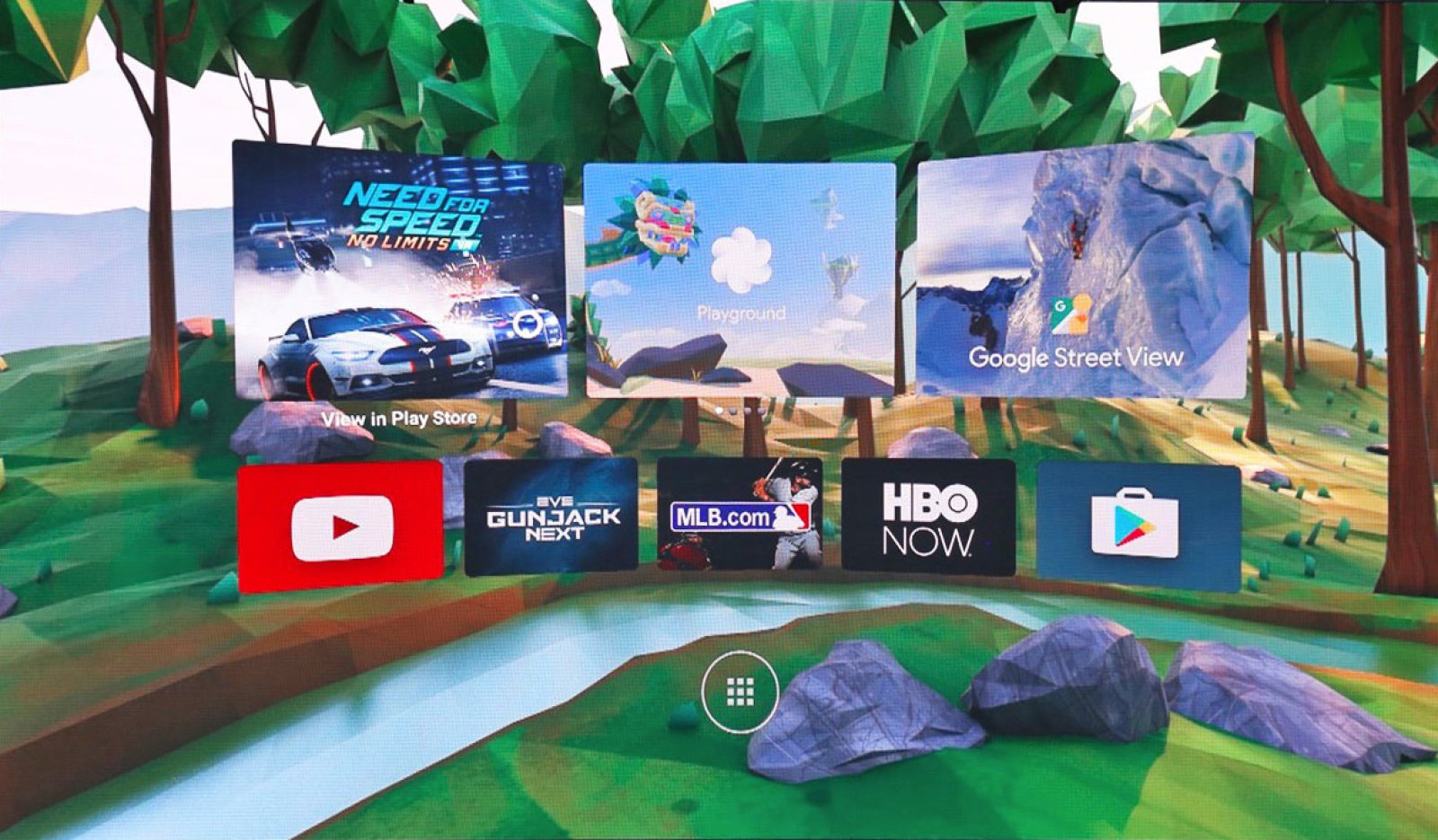
Google opens Daydream VR platform to developers


From its debut at Google I/O, Daydream seemed like a much more ambitious smartphone-based VR software platform than the earlier Cardboard system. The countdown clock for the former's public release began after a Bloomberg article back in August hinted at its imminent launch. While we're still waiting for the first Daydream phones to come out in fall, Google's VR SDK version 1.0 supporting it has officially left beta and is available to download on their developer site.


If you want to get your app out on launch day, you'll want to apply for the Daydream Access Program: It seems Google is carefully controlling what will be available when the platform goes live. The VR SDK supports both the Cardboard API and the more complex Daydream one, which includes the platform's proprietary controller. Google partnered with Unity and Unreal to get native integration, with all the binaries and plugins available through their developer blog post.
But how, you ask, will prospective programmers be able to tinker with their apps before "Daydream-ready" phones are released in the next few months? The only one approved to handle the SDK is the Nexus 6P, but it's not a perfect fix. Expect the device to run very hot and "thermally throttle CPU and GPU performance after a short period of use, depending on workload," according to Google's developer kit setup.
Please visit our websitewww.pixotrigames.comhttp://pixotritechnologies.com/Game-Development.html  to take a look at our projects

Wednesday, September 21, 2016

Spelling Trainer game download

Spelling Trainer lets you test your spelling knowledge and learn new words in a fun and interesting way. Fill out the missing letters to complete each word. Each correct spelling will allow you to unlock higher levels and further challenge yourself. With tons of words to play, Spelling Trainer is guaranteed to engage those of all ages! Spelling Trainer is designed as an educational game for kids, but is enjoyable for everyone. With the easy to adjust difficulty settings one can master Spelling skills with ease. The spelling game educational app features soothing colors and interactive animations to make spelling even more fun and engaging. With the built in save functionality you will always be able to continue to save your progress and develop your spelling skills at any time. Spelling Trainer game has two different game modes that will help you improve your spelling. The game modes increase in difficulty depending on your progress within the game, so there is always challenging spellings to keep you engaged! Thousands of simple and complex words and with regular updates!!


Game Features

  •  Easy tap gameplay
  •  Range of words with varying levels of complexities
  •  Improves your spelling skills
  •  Learn new words
  •  Elegant colour themes


Download this FREE Game from Play Store, Windows Store & App Store


Pixotri game studio is committed in building engaging gameplay and delivering an amazing gaming experience to all of our customers.
Contact us for your mobile gaming requirements 

Please visit our websitewww.pixotrigames.comhttp://pixotritechnologies.com/Game-Development.html  to take a look at our current projects and also some of our upcoming games.

Tuesday, September 20, 2016

download free Bubble Pop game


Fun and Addictive Bubble Pop game! Bubble Girl is an entertaining game for kids and all age groups. Pop the maximum amount of bubbles without losing lives. Soothing visuals and engaging sounds for immersive game play. Beware of the naughty bubble. When you pop it you lose a life.


Game Features

  •  Pop the maximum amount of bubbles without losing lives.
  •  Soothing visuals and engaging sounds for immersive game play
  •  Pop the power up bubbles to earn additional points.
  •  No Ads while playing


Download this FREE Game from Play Store, Windows Store & App Store


For more visit, http://pixotrigames.com/thebubblegirl

Pixotri game studio is committed in building engaging gameplay and delivering an amazing gaming experience to all of our customers.
Contact us for your mobile gaming requirements 

Please visit our websitewww.pixotrigames.comhttp://pixotritechnologies.com/Game-Development.html  to take a look at our current projects and also some of our upcoming games.

Sunday, September 18, 2016

Check how Google Chrome Beta allows Android to play YouTube in the background

Google has fascinating features for the Android users which allows background video and playback and a redesigned new tab page.
Google, the tech giant developed its chrome browser version 54 to the mobile Android operating system with new feature which is likely to burn out the YouTube Red paid service in the market. In Chrome Beta 54 version, the user is allowed to play videos and audio streaming at the background while the user is busy with other apps.


According to Techtimes, the new Chrome beta version is packed with two features - Playing Videos in the background and redesigned new tab page.
The former feature is newly introduced by Chrome, as the feature of playing background music and video streaming with other apps open was available only with the paid service of YouTube known as YouTube Red. Though the feature was very helpful for keeping the video streaming at background with other apps opened up on the mobile, the option from YouTube was a paid one.
The new competitive feature from Chrome might push the option from YouTube back or might be paralyzed- as it is a paid subscription service. The working of this feature is not the same as it was in Chrome version 53, in which the videos will get paused once a new app is opened or after switching to the home screen.
In version 54 beta, the videos will still get paused automatically but Android users are provided with an option to resume them via a media notification. Audio from the video will continuously be heard while using other apps.
The latter feature of redesigned new tab page from Google chrome has few changes like the unavailability of bookmarks and the recent tabs shortcuts, instead provided with drop-down menu at the upper right of the UI.  Google has added a recommendations section specified to be as Google Now offers stated by Android Police.

Friday, September 16, 2016

How to master the new iPhone 7 and iPhone 7 Plus

The iPhone 7 is a lot like its predecessor. It looks identical, save a slightly different camera on the standard model and an additional lens on the iPhone 7 Plus. And when put in a case, you wouldn’t be able to tell this year’s Apple product from last year’s, even if you ordered one with the new "jet black" finish.
Sure, inside there are faster processors, slightly bigger batteries, and lenses with higher megapixel counts. (Oh, and no headphone jack.) But we’ve reached a point where that doesn’t really matter. The average consumer isn’t so concerned with subtle design iterations or incremental spec improvements so much as they are with how technology feels. The important question is whether consumers feel like a new gadget makes their lives easier and enriches the experiences they love, be it snapping photos, or chatting with friends, or staying informed.
So maybe you just bought the iPhone 7, and you’re holding it in your hand right now, reading this story, and wondering, "What now?" Well, know that the device you’re holding is designed to be the most optimal piece of hardware for iOS 10, which is really where you’ll see, feel, and appreciate how far the mobile industry has come. We may be due for a big hardware upgrade soon — next year’s rumored 10-year anniversary version of the iPhone is said to be Apple’s biggest leap in ages. But with the iPhone 7, you can certainly glimpse what’s around the corner, and take advantage of that foresight today. Here’s our guide on where to start.

Apps, stickers, and iMessage games to download

With iOS 10, Apple is unleashing the full creative force of the App Store onto iMessage. Now you can play games, paste stickers, and cause virtual pandemonium with your iPhone-using friends thanks to all the add-ons you can download straight from Apple’s new chat store. There’s a lot of junk in there, so it takes some time to sift through it and find the good stuff. We’ve highlighted some options below, as well as a few must-have apps for the modern mobile home screen.
Outfolded: Developer 3 Sprockets have mastered minimalist mobile design with the puzzle game Outfolded. The app intro recommends headphones, and pleasing tones echo back and forth as you fold out geometric shapes of different sizes to reach an end destination. It looks, feels, and sounds a bit like Ustwo Games’ Monument Valley, and that’s a good thing. Outfolded is an easy way to kill time, relax, and exercise your brain. Plus, it’s free.
Fantastical 2: So Microsoft killed Sunrise’s excellent calendar app, and you refuse to switch over to Outlook. Luckily, there’s an alternative. For $2.99, you can get Fantastical 2’s mobile app, which gives you a powerful set of tools to manage your calendar, set reminders, and search events across your schedule. Its desktop version is a eye-popping $40, but for those of us who need a solid mobile replacement that has a better feature set than Sunrise, Fantastical 2 is worth the money.
Motion Stills: We loved Google’s Motion Stills when it was released in June, and we’re still loving it. Apple did make some enhancements to its Live Photos with iOS 10, like being able to edit and crop them, but Motion Stills makes it easy to see all your short videos in one place. It’ll also turn them into shareable GIFs, toggle sound on and off, and stabilize them. This is the primary way I’m creating videos for Instagram now. Thanks, Google, for this great iOS app.
Pokémon Pixel Art sticker set: Now that iOS 10 supports stickers in iMessage, we can run rampant on group chats with all sorts of logos, images, and over-expressive smiley faces. And nothing is quite as obnoxious as responding to everything our friends say with a pixelated Squirtle. The pokémon sticker pack, which costs $1.99, lets you choose between a number of sprites and text boxes from the original pair of Pokémon games. It’s a must-buy for those of us who love to derail group chats and escalate emoji wars.
GamePigeon iMessage app: iMessage apps may be a desperate ploy to stave off competition from Facebook, but it’s still nice to be able to play games inside the default iPhone messaging client. GamePigeon has a tacky design, but it’s a solid way to get familiar with the iMessage format and challenge friends to board games. There’s poker, pool, and a simplified version of Go, and the developer is adding more games in the future. For a free app, it’s a good start.
Poncho Weather widget: Poncho is taking full advantage of the new iPhone lock screen with its weather app. Let’s be real, most widgets look like an afterthought to an app, but not Poncho’s. It’s well-designed and convenient. Its signature weather cat is included on the widget to update you on weather throughout the day along with some jokes. Poncho is way more fun than Apple’s boring weather app.

iOS 10 features to try

iOS 10 is one of Apple’s biggest software releases to date and comes with a lot to discover. Seriously, it almost seems like Apple hid new features just to make us hunt to find them. We can’t list everything here, but we’ve included some of our favorite new features that you’ll definitely want to try. Hello, new flashlight settings.
Have a text convo from the lock screen: I always fire off text replies from my lock screen. I don’t have time to open up a thread, c’mon. Now with iOS 10, you can view the last few text messages in a thread if you force touch on a message you received. You’ll also be able see a person texting with the typing bubble. It’s the Message app but mini. I’m mainly using it when I’m in the middle of a heated conversation and don’t feel like unlocking my phone to continue it. Finally, a real use for 3D Touch.
Turn read receipts on a specific thread: This is kind of like waging psychological warfare, but just for a day, try turning on read receipts. Don’t resist the urge. Before iOS 10, turning read receipts on meant the setting was applied to every text thread, but now you can decide which threads you want the receipts to be on. I know some people who have read receipts turned on for work. This makes sense. I know other people who only turn them on when they’re dating and want to mess with their partner’s head. That’s crazy. But it does seem like this new iOS feature was made for trolling.
Edit a Live Photo: Live Photos are one of the more under-appreciated additions to iOS in recent years. With a simple one-tap toggle, we can turn photos into short-form GIFs that respond to finger pressure. With iOS 10, we can also edit those Live Photos for the first time. That means adding filters and tweaking the exposure and color balance of images. It’s not super groundbreaking, but it does help bring Live Photos on par with the static shots we’re more likely to share on Instagram, Facebook, and elsewhere.
Delete the stock apps: For almost a decade, iPhone users have been clustering the collection of stock Apple apps into a folder and passive aggressively naming it "Crap I Don’t Need." With iOS 10, we can now rid ourselves of that preloaded software. (We’re actually just hiding it from the home screen, but let’s forget about that technicality.) Still, the change means we can now delete ever-persistent apps like Notes, Mail, and Maps, all of which are lackluster in comparison with third-party (mostly Google) alternatives.
Emojify all of your texts for a day lol: Apple wants us to converse in emoji. With iOS 10, our text threads will now suggest correcting some words to emoji. The word "basketball" will bring up a basketball image, for example. Maybe emojify is worth a try? Can you convey a point faster and easier? Is it more universal? Good luck out there.


Settings tips & tricks

With each new iPhone and iOS refresh comes a new set of sometimes perplexing rules, options, and settings panels. Figuring out how to take advantage of a new perk, or how to revert something back to the way you like it, can be frustrating. Plus, users who haven't upgraded in two years will have to wrap their heads around 3D Touch for the first time. So there’s a lot to learn, and it could take some time until your preferences are in order. Start with these tips.
Bedtime feature: Apple changed up its Clock app a bit to bring in a new bedtime feature. Scientists tell us we should go to sleep at the same time every night and wake up at the same time every day to keep from feeling exhausted. That’s great in theory but hard to practice, especially when you relish sleeping in on weekends. Apple’s new feature will have you waking up at the same time every day to try and help you maximize your rest. It’ll remind you to go to sleep at a specific time to get a full night’s sleep and will calculate how long you slept based off when you start picking up your phone and moving around.
Adjust the home button: Over the years, Apple’s TouchID fingerprint reader has gotten so fast that it works even when we don’t want it to. The company has heard the feedback and for iOS 10 users, we now have to press in on the home button to unlock your phone. If you liked just being able to rest your thumb to unlock, you can head over to Settings, tap Accessibility, and find the Home Button option. There you can toggle on the "Rest Finger to Open" option to go back to the good old days of accidentally unlocking your phone when you just meant to check the time.


Download simple brain puzzle game


Mind Dot Game is a game designed for everyone who loves simple brain puzzles and brain teaser games. The games tests your concentration and ability to respond based on changes in the game. The player has to match the colour of the spring board with the dots colour.


Game Features
  •  Endless game
  •  Tap to move the spring board.
  •  Match the colour of the spring board with the dot.

Download this FREE Game from Play Store, Windows Store & App Store


For more visit, http://pixotrigames.com/minddotgame.php


Pixotri game studio is committed in building engaging game play and delivering an amazing gaming experience to all of our customers.
Contact us for your mobile gaming requirements 

Please visit our websitewww.pixotrigames.com,http://pixotritechnologies.com/Game-Development.html  to take a look at our current projects and also some of our upcoming games.


Tuesday, September 6, 2016

Learning Mathematics through Games


Feel sleepy when you open your math book??Here have a solution…. Learn math in a funny way.  Math game trains you to improve your math skills and cognitive abilities. The game will help kids and adults to improve their math skills in a fun way. The game has a user friendly interface designed to learn and improve your mathematics knowledge. Progress your arithmetic abilities from addition, subtraction, multiplication and division in a time trial environment.


Game Features

·        Progress your arithmetic abilities from addition, subtraction, multiplication and division in a time trial environment.
·        The game will help kids and adults to improve their math skills in a fun way.

Games give your child the opportunity to improve cognitive skills such as solving problems and developing positive attitudes towards mathematics, through reducing the fear of failure and error. Playing games can be a way out for your child escape from the pressures to reduce stress levels. When played repeatedly, Math game support students’ development of computational fluency

Download this FREE Game from Play Store, Windows Store & App Store


Math Game = Learning + Fun

Pixotri game studio is committed in building engaging gameplay and delivering an amazing gaming experience to all of our customers.
Contact us for your mobile gaming requirements 

Please visit our website, www.pixotrigames.com, http://pixotritechnologies.com/Game-Development.html  to take a look at our current projects and also some of our upcoming games.