Showing posts with label android news. Show all posts

Monday, March 28, 2016

How To Install Unauthorised Apps On Android And iOS


How To Install Unauthorised Apps on Android and iOS

Google and Apple like to keep you safely inside the walled gardens of their respective app stores, but vaulting over those confining walls is actually pretty easy — as long as you know what you’re doing. In this guide, we’ll walk you through exactly how to install unauthorised applications in process otherwise known as sideloading.
First of all: You should know the risks. Apps only need to be sideloaded when they aren’t officially approved by Google or Apple, and that means you’re throwing away all the safety and security their respective approval provides. You need to be very, very sure you trust an app before you allow it on your phone, otherwise you could expose yourself to hacking or phishing threats.
So why is sideloading important? Sometimes you might want to install an app that doesn’t meet the rules of iOS and Android; or you might want to join a beta test where only unofficial app packages are available. Most users will never need to sideload an app in their lives, but it can be a handy trick to know.
It’s worth repeating though that you should do this at your own risk — you’re giving the virtual bouncers employed by Apple and Google the night off and running security yourself. Only sideload an app if you’re 100 per cent sure it’s not going to do anything untoward with your data or your device.

Android
How To Install Unauthorised Apps on Android and iOS
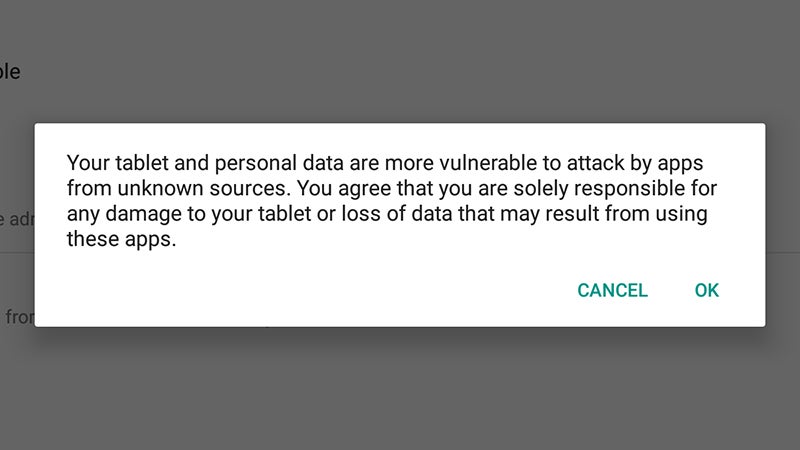
Sideloading is slightly easier on Android. First, you need to tell the operating system that you’re prepared to allow unauthorised apps on your device (apps from “unknown sources” in official parlance). Head to Settings then tap Security and toggle the Unknown sources switch to On.
With that done, you simply need to get an APK (Android Application Package) on your device in whatever way you prefer: you can download it from the web, transfer it via USB, use a third-party file manager app, and so on. Just be very sure you get it from a reputable source, as even genuine APKs can be bundled with unwanted extras.
Launch the APK using your app or file manager of choice and once you’ve tapped through the standard warning message the app installs itself — from this point on you can use it (and uninstall it) as normal. In most cases the app will auto-update itself as well, although this can vary.

iOS
How To Install Unauthorised Apps on Android and iOS
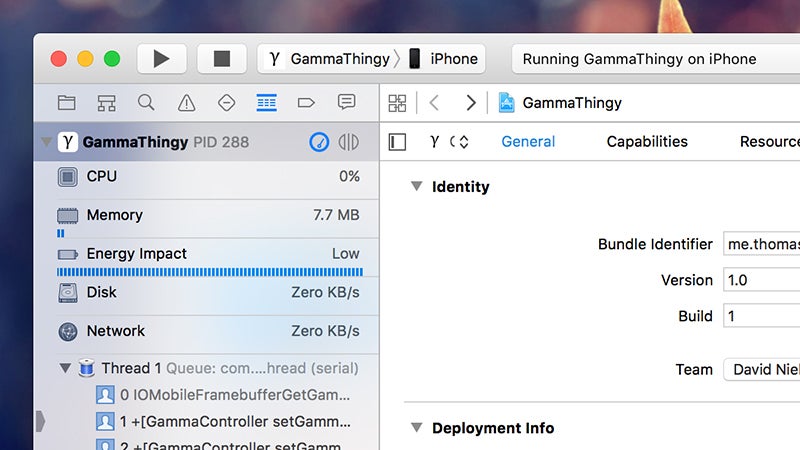
To sideload apps on iOS you need to take advantage of a recent change to the Xcode software. For the uninitiated, Xcode is a free developer app available through the Mac Store. Installing unauthorised apps is a more involved process than it is on Android, and it comes with a few more limitations.
Once Xcode is safely installed on your device, add your Apple ID details under Accounts in thePreferences dialog (in the Xcode menu). You then need to obtain the source code for the app you want to install in iOS: it could be a Game Boy Advance emulatora display tweaking utility or a weighing app.
Depending on the app, you might need to do some preparatory work, but if a developer is making the source code available then you’ll usually find basic instructions included to get it into a form that Xcode can recognise. Use File then Open to open up your app, and select the project on the left.
Connect your iOS device, then from inside Xcode choose ProductDestination and select your device. Give the package a unique name in the Bundle Identifier field (under the General tab), make sure your Apple ID is selected as the team name, and you’re just about good to go.
Click the Run button (top left) to compile, load, and run the iOS app on your device. It’s not quite as straightforward to follow as the Android approach, and may require some extra work, but it’s worth trying for those apps you really want to on your iPhone that aren’t listed in the app store.

Tuesday, February 23, 2016

Cyanogen launches ‘MOD’ platform to give developers Google-like access to Android OS


Cyanogen has introduced 'MOD' for its version of Android OS.
Above: Cyanogen has introduced 'MOD' for its version of Android OS.
Image Credit: Cyanogen

BARCELONA, Spain — If Cyanogen had any say, all those apps cluttering your smartphone would go the way of the dinosaurs.
Of course, that’s not going to happen anytime soon. But the Palo Alto-based company has announced a new version of its Android-based operating system called ‘MOD’ that will give developers an ability to integrate their apps into a phone’s OS that is normally reserved for Google.
“We believe this is truly disruptive,” said Vikram Natarajan, Cyanogen’s senior vice president of global partnerships and distribution. “Every developer wants to know how to access the phone’s OS on a deeper level.”
MOD is the latest salvo from a company that has raised $110 million in venture capital to develop a distinctly different version of Android — one that undercuts Google’s advantage in giving away the free operating system. While Google doesn’t directly make money from Android, many of its own apps (Gmail, Google Now, Search, etc.) are embedded in each version of the OS at a deep level.
Previously, Cyanogen’s OS let users install a version of Android that removed the apps that typically come pre-installed on an Android phone, whether they came from Google, Samsung, or some mobile phone carrier.
Now, with the MOD platform, developers will be able to go one step further and build their apps directly into the Androids OS, rather than having them sit on top as separate program.
“Normally this access is reserved for Google and Apple,” said Stephen Lawler, Cyanogen’s vice president of engineering. “We’re democratizing that.”
In the initial version, for example, Cyanogen has partnered with Microsoft so that Skype and Cortana can be built right into that phone. That means, in the case of Skype, that a user doesn’t have to tap on a Skype app button to launch the service.
Instead, Skype is built into the phone’s main caller, so a call may be happen through Skype or through the regular phone itself.
With Cortana, Microsoft’s voice-activated personal assistant, users can use their voice to control basic phone functions, like asking the camera to take a selfie. This means users are not just limited to the features within the Cortana app.
These types of partnerships will necessarily be limited, since Cyanogen can’t bake hundreds of app-like services into the OS. But because this kind of access will be so fundamental, Cyanogen will negotiate with developers to take a small slice of whatever types of revenue they derive from these built-in services.
Execs will also sell carriers and phone manufacturers on the idea that this deep integration offers a version of Android that will stand out from the hundreds of other Android-based phones sold around the world.
“In an ocean of sameness in Android, you want to stand out,” Natarajan said.

Thursday, February 11, 2016

Android Marshmallow Review: The Best Mobile Platform


Google delivers another EPIC update in the form of Android Marshmallow, a truly huge and awesome platform for phones and tablets


Last year, with the arrival of the Nexus 5X and the Nexus 6P the Android world was all about Android Marshmallow 6.0. The new build, previously known as Android M, built on Google's earlier advances with Android Lollipop, continuing the wonderful new Material Design ethos, but importantly it introduced a number of new and powerful features, as well as further enhancing performance optimisations with the 64-bit architecture and, a BIG deal for many users, some excellent built-in power saving features. After all, we all want our phones to run for longer, don't we?
We've got Android 7.0 to look forward to this summer, and you can already bet it'll be called Android N. In the meantime though, let us take a look at what's hot (and maybe what's not) about the current version...

Android Marshmallow: App Permisions

A seemingly small and unexciting change at first glance, app permissions inside Android Marshmallow have been extensively tweaked. Why's this a good thing?
Well ok, if you're a long-time Android user you'll be familiar with this scenario: you download and install an app from Google Play and it gives you a wall of text saying these are the app permissions you need to grant - it's weird, and confusing, and a bit of a hassle.
Android Marshmallow takes a different route, with app permissions being individually bundled up and distributed to you as and when you use a certain feature that requires it. Itnow lets users reject or approve permissions from individual apps and individual functions within the app itself. You won't be hit with a big wall of permissions when you install an app anymore, instead when you use a feature, say the voice message recording inside WhatsApp, it'll ask you for permission then, rather than up-front.
You can still go into permissions for any given app and tweak them at any time, however. This pretty much streamlines app installation and use, and for features you never use, you'll never get asked to grant permission!

Android Marshmallow: Web Browsing & Chrome

It wouldn't be new Android without at least some attention given to the web experience via the Chrome browser. Most notably Google has added "custom tabs" which allow Chrome to open up links to web content inside an app as an overlay, rather than jumping you out of the app entirely and into the full-blown browser, as has been the case until now.
This feature will allow app developers to customise the tabs to fit the look and feel of their own app design language, but will be directly linked to Chrome on that device and a logged-in user account, preserving things like remembered passwords and login details - allowing for a seamless experience.
Again, this is more streamlining from Google and it's very welcome too, as it was a bit laborious being booted out of an app and into Chrome for every bit of shared content or hyperlink.

Android Marshmallow: Fingerprint Scanner

Between the inclusion of fingerprint scanners on a range of Android phones (including the new Nexus devices) and the rollout of Google's own Android Pay it was inevitable that some attention be given to fingerprint scanning and biometric security. Google's gone for standardised, built-in support for fingerprint authentication, allowing developers to make use of the feature for unlocking devices, logging into apps and content, and purchases via web stores or points-of-sale in bricks n' mortar retail outlets.

Android Marshmallow: Android Pay & Mobile Payments

Android Pay is now rolling out and is a natural evolution of Google Wallet — the Big G’s first attempt at mobile payments. Android Pay has been redesigned and rejigged with 2015/16’s market in mind. In order to use it you will need Android handset running Android KitKat and above and NFC — bad news for OnePlus 2 owners, then! Unlike Apple Pay, Android Pay does not require a fingerprint scanner, despite many new Android handsets shipping with one. If you don’t have a fingerprint scanner on your phone you can authenticate a payment using a PIN, pattern or password.

Android Marshmallow: Battery Optimisations

Doze is designed to make your Android Marshmallow handset suitably more power efficient. How it works is simple: sensors detect when you’re not using your phone, say while watching a movie or reading a book, and put it into a kind of sleep mode so it uses less power. This is an excellent addition to Android and one that adds in a bunch more hours to a handset’s idle performance. You’ll even notice the difference on older hardware like the Nexus 5.

Material Design: New App Drawer & New Animations


It's not a big visual overhaul but Material Design has been tweaked a little, most notably the new animations designed to make everything even more visually integrated, intuitive, and seamless. On top of this a new app drawer design is much cleaner, features vertical scrolling, discretely colours itself the same way as your wallpaper, and prioritises your most-used apps at the top. Lastly, Google has added a more seamless homescreen rotation functionality, and options for toggling this on or off.

Android Marshmallow: Android RAM Manager

No this isn't a kind of shepherd. The Android RAM Manager keeps a close eye on your phone's Random Access Memory and shows you a much more detailed background of which apps are most hungry for your phone's grey matter.

Android Marshmallow: Adoptive Storage

Adoptive Storage allows the Android system to "adopt" an external memory device such as a microSD card and treat it as onboard storage. Excellent stuff! Now we just need OEMs to start including microSD-support again and everything will be good again!

Android Marshmallow: Dark Theme


Pretty much does what it says on the tin; there's a dark theme now if you want it!

Android Marshmallow: Google Now

Plenty of attention has been focused on Google Now, generally with the intention of making it smarter, faster, more responsive and accurate, and overall easier to use and get exactly what you need out of it.
Google says the Google Now suite understands context better than ever before, so for example, if you have a route set up in your Maps already you can ask "how far is it?" and Google Now will know you are referring to the current route's end destination - you don't have to be so specific any longer.

Android Marshmallow: Voicemail

Google has expanded voicemail functionality to include a lot more useful details at a glance and allowing you to control your message playback via a slider, pause, delete and much more, rather than having to go through the annoying process of pressing number keys to perform these functions when prompted.
This functionality will need to be enabled on a carrier-by-carrier basis, but support is expected to become widespread.

Android Marshmallow: Status Bar Customisation

The settings menu has been expanded to allow you to directly customise which icons appear in the status bar - don't want to see a Bluetooth indicator? Toggle it off or on as you wish.

    Wednesday, February 10, 2016

    Play Store v6.2 Adds App Recommendations From Our Itineraries In Gmail [APK Download]


    There's a new version of the Play Store floating around in the wild, taking us up to v6.2. If you haven't read the title already–which might be possible–you probably want to know what this update includes. There's really only one immediately visible feature, and it's not big, but it's there: the Play Store can now use your Gmail messages to give app recommendations. There are also a couple of minor changes to the navigation drawer and even something we already knew about that will get a teardown mention. Let's be honest, you're here for the apk, so just jump to the link at the bottom and start downloading.

    What's New

    Recommendations from Gmail Itineraries

    2016-02-10 00.35.34


    The notable addition in this version is a new toggle in Settings that gives Google the permission to provide app recommendations based on itineraries found in your Gmail account. What does that mean? You're probably going to see some pretty obvious stuff, like the app for an airline after you book a flight. Maybe you'll get language learning and translation apps if you're headed to a foreign country. Who knows, maybe a dinner reservation will earn a link to Yelp.
    I think this is a pretty great idea, if for no other reason than it should lead to some recommendations based on something more useful than what our friends liked. I've had this version of the Play Store installed for a little over a day and I've yet to see a recommendation based on my email, so I'm not sure if this feature is actually active yet, but I also don't have a lot lined up for the next couple of weeks. Somebody with more immediate plans might have a better chance of seeing some results.
    Obviously, some people will feel like this is an invasion of privacy, so they can turn the option off if they like.

    Minor Nav Drawer Tweaks

    2016-02-10 00.40.272016-02-10 00.40.18
    Left: previous version. Right: latest version.
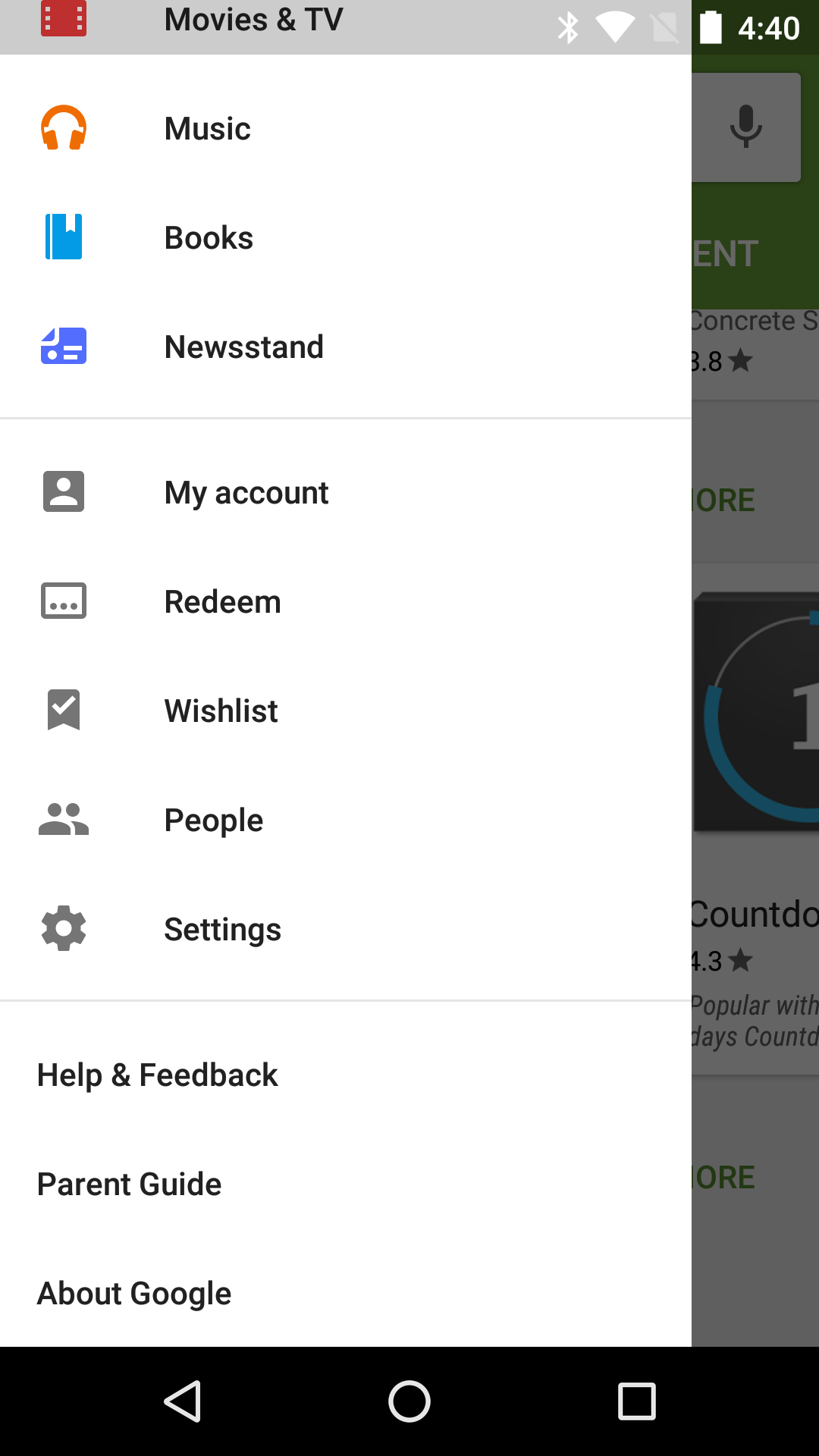
    I doubt–even hope–that nobody cares about this, but we saw this and don't want to get too many tips about it. There are two trivial changes to the navigation drawer: "My wishlist" has been shortened to "Whishlist" and it has traded places with "Redeem." There's really nothing more to it, I've checked. Nevertheless, if you're actually using either of these options enough that you have some kind of muscle memory built up for where they are situated, this little change is gonna drive you nuts.

    Android Founder Andy Rubin Wants To Monopolize AI With A Dash Cam And Your Data


    Former Google exec and Android co-founder Andy Rubin has announced his latest designs for the tech industry - and his plans to take over what he considers the most important technological frontier of the decade: artificial intelligence.
    Rubin laid out his latest tech endeavor, in an exclusive with Wired: a mission to more or less monopolize the artificial intelligence (AI) pocket of the market. While Rubin's newest tech incubator Playground Global is the tech mogul's gateway toward this endgame, it appears that the godfather of Android is only willing to concretely reveal one facet of his vision: a plan to create a visual traffic map with help from a free device and an unusual business model.
    The big reveal came in the form of Playground's dashcam hardware, accompanied by an unprecedented plan for the cam's data. According to Rubin, the device would be given away to customers with one caveat: unhindered company access to each dash cam's data set.
    While Rubin did not explicitly give a step-by-step explanation for the atypical proposal, it seems as if the composite data from each dash cam would be used to piece together a real-time, large-scale visual map which would aid drivers in avoiding commuter pitfalls like congestion.
    So what else exactly does Playground and its founder have in store for the industry? While Rubin - a tech veteran who began his career at the Apple-owned handheld communications company General Magic, followed by a tenure at Google with stints as the creator of Danger Inc. and Android - has provided info on a need-to-know basis, his other Playground-related projects are currently shrouded in mystery. The reason? As Rubin himself put it, he's currently just "not willing to talk about" them. 
    What is Playground's mission, especially in regards to a) Rubin's lock-and-key approach to Playground product details, and b) AI as we know it? 
    In an official statement issued by the Playground founder on Feb. 5, Rubin extrapolated upon what the next shift in the "dominant computing platform," which he noted occurs roughly every 10 to 15 years, and what exactly the next progressive stage will be. After charting the watershed innovations of the recent past - "mainframes to minicomputers to PCs," followed by the Internet and the "mobile era," the tech entrepreneur and programmer deduced that the next wave will be a device-operating cloud with "mature deep-learning capabilites," which Playground intends to delve into and develop further.
    "Getting the rest of the way there will require hundreds of millions of data points - more data than humans at keyboards can possibly provide," Rubin continued. "The various devices you interact with daily will free the cloud from it's [sic] proverbial 'brain in a jar' jail and allow it to interact with us in our environment - our homes, cars, and offices. And it will give those devices, in turn, more purpose."
    Of course, as the Wired profile also indicated, exactly what kind of hardware - devices, bots, or otherwise - is still more or less an abstract to the public, despite Rubin's promises of revolutionary vagaries. Despite this, the CEO underscored a pioneering spirit. 
    "We're aiming big and thinking decades into the future," the CEO concluded in his company's blog post. "In the meantime, we're going to make some truly great things."

    Monday, February 8, 2016

    Android-x86 4.4-r5 Might Be the Last Release in the Android 4.4 "KitKat" Series


    We reported two weeks ago that the Android-x86 4.4-r4 might just be the last in the Android 4.4 KitKat-based series of the Linux distribution, but it looks like the developers decided to make one more maintenance release.
    And so, the Android-x86 4.4-r5 build has been released the other day and it is now available for download, for new users, or upgrade, to existing ones. The fact of the matter is that Android-x86 4.4 is currently the only stable branch of the project.
    It's, of course, a quick bugfix release that patches a more some issues with hazi fonts in the Mesa 3D Graphics Library 10.5.9, which were reported by users with Intel i5 GPUs. So if you still encounter the hazi fonts issue with your Android-x86 4.4 build, you need to upgrade.
    "The Android-x86 4.4-r5 is a bugfix of the 4.4-r4 release. It addresses more hazi fonts issue of Mesa 10.5.9 found on Intel Gen5 GPUs. You are encouraged to upgrade to this release if you still encountered the hazi fonts issue," developers explained.

    Some known issues are still present in this release

    From the release notes, it looks like there are still some knowing issues for this version, which users should be aware off. For example, on some machines, the suspend and resume functionality might not work as expected, and the installer it now capable of formatting partitions with the EXT3 file system.
    If this is the first time installing Android-x86 on your computer, you should download the Android-x86 4.4-r5 ISO images right now via our website. On the other hand, we recommend existing users to upgrade to the Android-x86 4.4-r5 release as soon as possible.

    Friday, February 5, 2016

    Google Engineer Shows Off Android Smart Mirror Prototype


    We now live in a world where your bathroom mirror can show you the time, temperature, and news headlines as you're brushing your teeth in the morning. Well, one Google staffer can, at least.
    In a recent blog post, Google software engineer Max Braun said at some point late last year he realized he wanted his basic bathroom mirror to be smarter — like the one from that 2000 Arnold Schwarzenegger movie The 6th Day. After searching online, he couldn't find what he was looking for. So, he built it.
    smart mirror
    Using a two-way mirror, display panel, controller board, other components, and arts and crafts supplies, Braun rigged up something pretty fantastic. Now, when he's looking at his mug in the morning, Braun can glance over to the right and see the time and date displayed directly on his medicine cabinet mirror or look left for the current weather, a 24-hour forecast, and recent news headlines.
    The code behind the user interface leverages some simple Android APIs like TextClock for the date and time, as well as Forecast for the weather and the Associated Press for news. He's also playing around with adding traffic and reminders to the interface.
    "The idea is that you don't need to interact with this UI," he wrote. "Instead, it updates automatically and there's an open-ended voice search interface for anything else."
    Braun said the project involved "quite a bit of experimentation and some dead ends" and his prototype is still a work in progress. The thing is currently powered by an Amazon Fire TV Stick, which runs an Android API that drives the UI. But Braun also experimented with using Chromecast and Nexus Player before putting together his "finished — yet by no means final" product.
    Android Smart Mirror

    Thursday, December 31, 2015

    New Mobile Malware for Android Discovered


    Malware developers continuously find newer methods for infecting people's gadgets. Some of the methods are so effective that the resultant malware threats cause immense harm. A very recent group of malicious programs, a discovery of Symantec, attacks Android devices being used inside China. This malware family has been dubbed Android.Spywaller, softpedia.com reports, December 28, 2015.

    Android.Spywaller is unique because when it infects, it hunts for the widely-used security application Qihoo 360 that Chinese Android-operators use. When the malware hunts as well as registers its presence on the Android gadget, it uses identical Unique Identifier (UID) that Qihoo 360 uses. After this, it plants the DroidWall binary, which is an edition of UNIX iptable a bundled program, customized for easy execution on Android gadgets.

    One popular firewall utility, the iptable bundled program is designed for Linux running computers. Moreover, DroidWall is the creation of Rodrigo Rosauro an independent security investigator, who after sometime gave away the binary to AVAST for a price during 2011. For some years, the application worked like an open source, and because of that malware developers may yet obtain it through GitHub repositories or Google Code.

    Similar as with Android.Spywaller, DroidWall too is usable for locking security applications so they can't interact with their servers, which may be cloud-based e-threat analyzers. Consequently, the security applications become unusable thus letting the malware run without any obstacle, while the device becomes safely accessible to the criminals.

    Symantec researchers explain the spyware pretends to be one Google Services application followed with utilizing an authentic security program, which's embedded on the device, for hijacking other security software which could have defended the device. At this point victims become lured since authorized Google utilities such as Google Play aren't available inside China. Consequently, the spyware causes the damage by loading its payload having the malicious program, inside the gadget's memory.

    The application, says Symantec, hunts data that it exfiltrates. The data include GPS readings, SMS, call logs, e-mails, system browser information, contact lists, images and radio items. Moreover, the application even garners data from QQ, Coco, Oovoo, BlackBerry Messenger, Talkbox, Skype, SinaWeibo, Wechat, Voxer, TencentWeibo, Zello and WhatsApp.

    Visit our website:  www.pixotritechnologies.com  , http://pixotrigames.com/

    Wednesday, December 30, 2015

    5 Apps to Help With Your New Year's Resolutions


    Want to make your New Year's resolution last more than just a few days? While it ultimately comes down to you, there are plenty of apps that can provide the extra motivation you need to stay the course.
    Whether it's quitting a bad habit or building a healthy new one, check out these five apps to help you reach your goals.
    $400 Buys New Year’s Eve Tickets...to Olive Garden

    Learn a Language

    If you've always wanted to learn a new language, now is a great time to start. Duolingo andBabbel both offer great apps for learning a variety of different languages. It's as easy as downloading the apps and slipping in a short lesson whenever you find some free time.
    Both have apps for iOS and Android. Duo Lingo has additional availability for Windows Phoneusers.

    Get a New Job

    Whether you're sick of your boss or ready for a new opportunity, there's always a treasure trove of jobs to be found on Indeed. The popular job search site has a mobile app for iOS andAndroid and it provides access to millions of open jobs. Search for jobs by using filters such as location and salary.

    Build a Positive New Habit

    Want to work on smiling more? How about completing one random act of kindness a day?
    Lift is an app that keeps those positive goals in your sight, letting you track your progress, get community support and celebrate your success. It's also great for pledging to throw out any bad habits. Lift is free on iOS and Android and offers additional in-app coaching starting at $15.

    Quit Something

    Whether its quitting smoking, drinking or talking to your ex, the free "Quit That!" app will help. Users can download the app, enter one or more things they want to quit and start the clock. The app lets users also put a price on how much the habit they're quitting costs per day. After a while, it's obvious skipping all of those happy hours can add up to some major savings. Quit That! is available for iOS users.

    Have Better Nutrition

    Knowledge is power. Fooducate helps you make smarter choices about the food you eat. Scan a product barcode to get nutritional info, along with some healthy alternatives. The app also comes equipped with a tracking feature to keep tabs on your nutrition and exercise. Fooducate is free and available on iOS and Android.