Showing posts with label ios apps. Show all posts

Wednesday, March 2, 2016

iOS 10 concept video shows off some intriguing new features


iOS 10 Features

With so much buzz surrounding Apple’s upcoming iPhone SE and the highly anticipated iPhone 7, we curiously haven’t heard much about iOS 10, the software that will power Apple’s next-gen lineup of smartphones.
With rumors surrounding iOS 10 few and far in between, visual designer Sam Beckett recently put together a concept video showcasing some intriguing and clever ideas Apple might be smart to incorporate into the upcoming version of its mobile OS.
Most of the ideas in Beckett’s video focuses on improvements Apple can make to iOS’ Control Center. For instance, one idea showcases 3D Touch integration with various Control Center toggles. So imagine, for example, being able to force touch the Wi-Fi toggle as a means to not just turn Wi-Fi on, but to also choose which wireless network to join.

Additionally, another concept shown in the video highlights how users might be able to pick and choose which particular toggles they’d like to appear in iOS’ Control Center in the first place.
As it stands now, the only iOS 10 feature we’ve heard rumblings about centers on a new service dubbed iCloud Voicemail that would use Siri to answer calls and transcribe voice messages.
In the months ahead, it’ll be interesting to see what type of cool new features Apple plans to incorporate into iOS 10, especially given that iOS 9 last year was largely focused on under-the-hood optimizations designed to improve the overall user experience and eliminate pesky bugs and performance issues.

Friday, February 26, 2016

Apple iOS 9.3 Has 2 Important Changes


Over the last 18 months I’ve held Apple (rightly) to task about several releases of iOS 8 and iOS 9 which broke as much as they fixed. But with Apple’s new iOS 9.3 release I want to applaud the company for making two commendable changes very quickly…  
Important Change #1
Earlier this month a serious yet ridiculous bug was discovered: setting the date of an iPhone, iPad or iPod touch to January 1st, 1970 would brick the device the next time it was restarted. Why would anyone do that? Because a hoax spread across the Internet that it would unlock a secret retro iOS theme.
Apple iOS 9.3 is a major upgrade. Image credit: Apple

Well just nine days later iOS 9.3 has stamped on this. MacRumours spottedthat Apple has come up with a very simple solution: users now cannot set the date to earlier than January 1st, 2001. Though why anyone would need to do that when they aren’t being tricked by a hoax is beyond me.
As for those unlucky enough to have already bricked their iDevice in falling for the date hoax, you can now use iTunes to restore the device to iOS 9.3 and it will magically return to life. I’ve seen some fast Apple patches in the past, but nine days is pretty great going.
Important Change #2
There’s a similar sense of speed in Apple’s second major iOS 9.3 change. The first three betas of iOS 9.3 did something highly controversial: it stopped the Apple Pencil from being used as a navigation tool around iOS, limiting it purely to being a creative tool.
Since this loss of Apple Pencil functionality was not listed as a known bug in the iOS 9.3 beta release notes, concern rose and a plea on iMore to restore the lost functionality gained a lot of attention. Now 46 days into the testing of iOS 9.3 Apple has spoken out:
“We believe a finger will always be the primary way users navigate on an iPad, but we understand that some customers like to use Apple Pencil for this as well and we’ve been working on ways to better implement this while maintaining compatibility during this latest beta cycle. We will add this functionality back in the next beta of iOS 9.3.”
Apple Pencil navigation support is not going anywhere. Image credit: Apple

Cynics have understandably claimed Apple has been forced into a U-turn following the growing outcry and used it as a PR opportunity. Of course that is impossible to prove and I think it matters little. More interesting is that a company stereotyped for thinking it always knows has opted for what consumers want after a short spell of testing and headed off a potential mutiny from iPad Pro owners.
I wouldn’t see this as a sea change moment (the iPhone 7 is still going to lose the headphone jack, whether we like it or not), but it’s still something to be applauded.
Changes For All
So when will these fixes be available to everyone? iOS 9.3 has just entered beta 4 (for public testers and developers) and has already surpassed the development time of both iOS 9.1 and iOS 9.2 so it shouldn’t be long now. If I had to call it? The first week of March.
Given that iOS 9.3 contains the most significant changes I’ve seen in an iOS point release in a long time, that date cannot come soon enough. Meanwhile I’d suggest anyone affected by the date bug skip the queue and join the Apple Beta Program to grab it right now. It’s time to bring your devices back from the dead! 

Wednesday, December 30, 2015

5 Apps to Help With Your New Year's Resolutions


Want to make your New Year's resolution last more than just a few days? While it ultimately comes down to you, there are plenty of apps that can provide the extra motivation you need to stay the course.
Whether it's quitting a bad habit or building a healthy new one, check out these five apps to help you reach your goals.
$400 Buys New Year’s Eve Tickets...to Olive Garden

Learn a Language

If you've always wanted to learn a new language, now is a great time to start. Duolingo andBabbel both offer great apps for learning a variety of different languages. It's as easy as downloading the apps and slipping in a short lesson whenever you find some free time.
Both have apps for iOS and Android. Duo Lingo has additional availability for Windows Phoneusers.

Get a New Job

Whether you're sick of your boss or ready for a new opportunity, there's always a treasure trove of jobs to be found on Indeed. The popular job search site has a mobile app for iOS andAndroid and it provides access to millions of open jobs. Search for jobs by using filters such as location and salary.

Build a Positive New Habit

Want to work on smiling more? How about completing one random act of kindness a day?
Lift is an app that keeps those positive goals in your sight, letting you track your progress, get community support and celebrate your success. It's also great for pledging to throw out any bad habits. Lift is free on iOS and Android and offers additional in-app coaching starting at $15.

Quit Something

Whether its quitting smoking, drinking or talking to your ex, the free "Quit That!" app will help. Users can download the app, enter one or more things they want to quit and start the clock. The app lets users also put a price on how much the habit they're quitting costs per day. After a while, it's obvious skipping all of those happy hours can add up to some major savings. Quit That! is available for iOS users.

Have Better Nutrition

Knowledge is power. Fooducate helps you make smarter choices about the food you eat. Scan a product barcode to get nutritional info, along with some healthy alternatives. The app also comes equipped with a tracking feature to keep tabs on your nutrition and exercise. Fooducate is free and available on iOS and Android.

Saturday, December 19, 2015

The iPhone is dominating mobile photography


iphone picture
Flickr, a social network based on photography, posted stats on Friday showing that more people used iPhones for their Flickr pictures in 2015 than any other smartphone or camera.
The iPhone 6 was the most used camera on Flickr, closely followed by the 5S, 5, 4S, 4, and 6 Plus.
iPhones took the first six spots in front of other smartphones and even DSLR camera. 
The most-used Android smartphone on Flickr's list is Samsung's Galaxy S4 in 11th place, followed by the Galaxy S5 in 13th place.
According to a chart Flickr's report, people have been using iPhones more and more since 2010, which is as far back as the chart goes. iPhone usage surpassed the more professional DSLR cameras around 2014.
The iPhone 6S and 6S Plus aren't on the list because they've only been available since September. Considering their new and improved 12-megapixel camera (over the 8-megapixel shooter in previous models), we're certain those phones will make it high in Flickr's list next year.
flickr iphone useFlickr
In a similar vein, we spoke with some Instagram stars earlier in November, and asked which phone they use for their Instagram pictures and why. It wasn't surprising to find that most of them used iPhones, and just one uses an Android phone (Galaxy S4).
However, many of the stars chose the iPhone for reasons other than its excellent quality camera. Some of them cited things like app choices and the seamless compatibility with their Mac computers as reasons why they chose iPhone.
In addition, the iPhone 6S was ranked as the most-searched gadget in 2015 by Google, showing that it's basically the gadget most people are most interested in. The iPhone's popularity is astounding.

Thursday, December 17, 2015

Google's Project Fi comes to data-only devices, including Apple's iPad Air 2 & iPad mini 4


Google's low-cost carrier service, Project Fi, is now available for a select range of data-only devices, specifically tablets including the iPad Air 2 and iPad mini 4.


People who are already activated on Fi can order data-only SIMs for the service, up to a limit of nine per account. Aside from iPads, other officially supported devices include the Nexus 7, Nexus 9, and Galaxy Tab S. Unconfirmed accounts suggest that the SIMs may work with other products, like the iPad mini 2.

Tablets share in the same data pool as smartphones, with a fee of $10 per gigabyte, but to keep bandwidth under control Fi's data metering tools let subscribers see a per-device breakdown. Unlike phones, tethering is banned for data-only hardware.

Google is promising varying levels of coverage in over 120 countries, although people can still only sign up for the service in the U.S. via an invite system.

Until this week, Project Fi was restricted to a handful of Google smartphones including the Nexus 6, Nexus 6P, and Nexus 5X. The service's main advantage is that it costs just $20 per month before data fees, with unlimited voice and texting, and any data that goes unused results in a 1-cent credit per megabyte. A person paying for 2 gigabytes who only uses 1 gigabyte, for instance, will get $10 back.

The service preferentially connects to Wi-Fi, but when out of range connects to Sprint and T-Mobile's networks or else various 3G networks outside the U.S.
Visit our website:  www.pixotritechnologies.com  , http://pixotrigames.com/

Tuesday, December 15, 2015

Google Maps For iOS Now Shows You When Stores Are Busiest, Plus Gas Prices


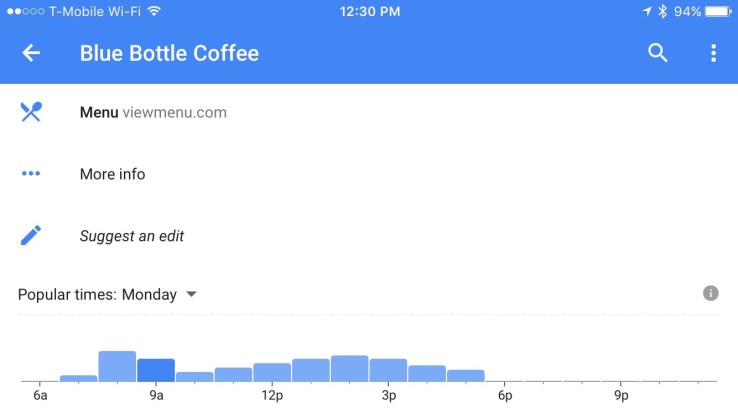
Just in time for your last-minute holiday shopping plans, Google has rolled out an updated version of its Google Maps iOS application, which will now show you when stores are the busiest. Armed with this information, you can better plan when to visit the location in question in order to avoid the crowds. The feature is available not only for retail stores, but for any business where customers are generally curious about the store’s “rush hours.” That means it extends to places like coffee shops, restaurants, grocery stores, gyms and other points of interest.
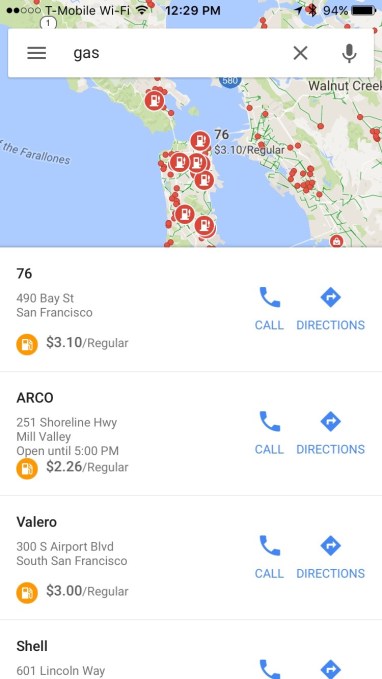
Additionally, the app is now showing gas prices when you search for nearby gas stations.
Google first began tracking businesses’ “popular” times in July, when it introduced the featurewithin Google Search. At that time, if you searched for a business on Google, it would offer a chart indicating when the store or other establishment became more crowded, using the anonymized data it gathers from users of the Google Maps application. The feature wasexpanded to the Android version of Google Maps this September, but had not yet arrived on iOS until now.
Meanwhile, the gas-price tracking is another new addition that was also available on Android first. This October, Google announced a new feature that would allow Maps users to add a stop along a route – like, say, a gas station or coffee shop – which the app would then direct you to before your final destination.
When this feature arrived, it also included support for seeing gas prices when you chose to include a gas station as your additional stop.
IMG_1898
While arguably a minor feature update – Google didn’t even bother putting out an official announcement about the iOS changes – it’s the sort of thing that helps Google Maps better compete with its rival Apple Maps on iOS devices, where it doesn’t have the benefit of being as deeply integrated into the mobile operating system.
Today, it’s not enough for mapping applications to offer just maps and directions. Extra information like prices, photos, hours, busy times and more can help push mobile consumers to use one application over another.
To help it gather more data about businesses, Google also expanded its “Local Guides” program this November, allowing any Maps user to help correct business listing errors or offer up additional business details by answering a series of questions that appear as pop-ups in the app, like “is it quiet here?” or “is the place family-friendly?”

This program also now includes questions that ask about how busy a store is – basically, another window on top of the anonymized data Google is already collecting.
The updated version of the Google Maps app is live now on the iTunes App Store. 

Monday, December 14, 2015

Google's iOS app receives update that adds 3D Touch support and more


Google's iOS app receives update that adds 3D Touch support and more

Google has updated its iOS app, adding support for 3D Touch. A heavy fingered tap on the app's icon will present an Apple iPhone 6s or Apple iPhone 6s Plus user with a shortcut menu to Google's voice, text or image searches. You also might notice that some new information pops up on your screen when you Google a local business, including restaurants and bars.

Search for a nearby business or eatery, and your Google search result will include a graph showing how busy this particular location is at certain hours. If you're in a rush, this information can be a timesaver. And Google has also updated its search results for iOS users, adding holiday hours for stores and restaurants. 

And with the update, the app will support some of the new features found on the Apple iPad such as Split View and Slide Over. Both will allow you to multitask by viewing the Google app while another app also appears on the screen. This can be very helpful if you're perusing an article, and need to look something up to clarify what you've just read.

The updated version of Google's iOS app is now available in the App Store, and takes Google's iOS app to version 11.0.


Visit our website:  www.pixotritechnologies.com  , http://pixotrigames.com/