Showing posts with label google updates 2016. Show all posts

Tuesday, April 5, 2016

Google’s Nexus security update for April fixes 8 critical Android bugs


Google is releasing the monthly security update for its Nexus Android devices today and with it, it is also announcing a list of the security vulnerabilities it has patched in this release. This month, the update includes patches for eight critical bugs, including one that affects the infamous libstagefright library, which has already seen its fair share of well-publicized vulnerabilities.
Google notified its partners about all the issues in this new bulletin two weeks ago and for them (and anybody else who is interested), source code patches will be made available through the Android Open Source Project in the next two days.
Google notes that the most severe of this month’s issues would have allowed remote code execution on an affected device “through multiple methods such as email, web browsing, and MMS when processing media files.”
The majority of the issues fixed with this update were first reported between late 2015 and February 2016. In total, this month’s update fixes just under 30 known vulnerabilities.
Nexus users should see an update for their phones pop up pretty soon. Now that at least a few other manufacturers are following Google’s lead in releasing monthly updates (or are at least promising they’ll do so), chances are they will also soon fix most of these vulnerabilities, too.
Visit our website:  www.pixotritechnologies.com  , pixotrigames.com

Wednesday, March 30, 2016

Microsoft Office 365, Google Apps in use together for many enterprises

Microsoft office google apps

Microsoft has held its dominance in the software market in part because it is the go-to provider for many business solutions. Word, Excel and Powerpoint are essential pieces of software across almost any industry, whether they are used for presentations and memos or tracking expenses and marketing products.
However, enterprise apps from competitors are growing in popularity, according toa new report from Okta, with apps and services filling gaps left by Microsoft’s products.
That doesn’t mean Microsoft is losing ground, though. In fact, Okta found that Google Apps and Microsoft Office 365 use overlaps at more than 40 percent of companies.

Popular apps Okta
Okta, a company focused on verifying identities across devices, found that the average employee has access to between 10 and 16 cloud-based apps. Microsoft Office 365 is the most-used app, with Salesforce, Box, Google Apps and Amazon Web Services also making the top five.

Microsoft actually extended their lead over the past year. That may be, in part, due to the growth of Office 365 as the go-to way to licence apps like Word and Excel on mobile and desktop devices alike. And with more employees using mobile devices to get work done, they want the same access to Office apps as they have to things like Slack and Google Apps.
Office is also maintaining its dominance even as companies add Google Apps to their offerings, letting employees choose between Microsoft or Google options. It turns out that employees stick with Office apps for many projects they’re getting done on their own, but when collaborating they switch to Google products.

Chart via Okta
Email-killer Slack is also moving up quickly, with a 77 percent increase in adoption in the second half of 2015. For companies that use Slack, it is used widely throughout the organization. While Amazon Web Services are used by less than 10 percent of employees on average, Slack is in use by nearly three-quarters of employees at organizations that use it at all. That puts Slack behind just four apps (including Microsoft Office 365) in terms of saturation.

Okta’s report also found that, while plenty of new players are shaking things up in the cloud, legacy apps have managed the transition well. Microsoft, Adobe and SAP all more than doubled adoption of cloud-based tools. The real difference is how they grew, with Microsoft and Adobe growing their own products from scratch, while SAP and Oracle focused on acquiring companies that had proven success in the cloud.
Visit our website:  www.pixotritechnologies.com  , http://pixotrigames.com/

Wednesday, March 23, 2016

Google is making a keyboard for the iPhone


Gesture-based typing, GIF searches, and more


Google has been developing a third-party keyboard for iOS that would put the company’s search engine in a highly used part of the interface, The Verge has learned. The keyboard, which incorporates a variety of search options, has been in development for months, according to people familiar with the matter. It’s unclear whether or when Google plans to release it. The company declined to comment.
The Google keyboard incorporates a number of features meant to distinguish it from the stock iOS keyboard. Like its Android counterpart, the Google keyboard for iOS employs gesture-based typing, so you can slide your finger from one letter to the next and let Google guess your intended word. Tap the Google logo and you can access traditional web search. It also appears to have distinct buttons for pictures and GIF searches, both presumably powered by Google image search. The keyboard is visually distinct from the standard Android keyboard, which incorporates voice search but no text or image-based searching.


google keyboard

Google Keyboard for Android
The keyboard, which has been in circulation among employees for months, is designed to boost the number of Google searches on iOS. While the company all but holds a monopoly on the global search market, there’s evidence that mobile search is proving much less lucrative for Google than the desktop. Using publicly available numbers, journalist Charles Arthur argued in October that half of smartphone users perform zero searches per day. (Using the same math, Arthur said desktop users perform an average of 1.23 searches per day.)
Even if the math is inexact, the trend is inarguable. A high percentage of desktop searches are for keywords like "Facebook" or "Gmail" — searches that are unnecessary on mobile phones, where users can simply tap on the relevant app to launch it. The problem for Google — and for Alphabet, its parent company — is that search is where Google shows users its most expensive ads. Any sign of decline in search would be an existential threat to the company.
All of which makes an iOS keyboard feel inevitable. But it remains to be seen whether iOS users have an appetite for Google’s approach to typing. Third-party keyboards have been generally been a disappointment on iPhones and iPads. When users have more than one installed, they must constantly cycle through them. Many third-party keyboards have also suffered from sluggishness and other performance issues.
But Google’s brand is strong, and for users who perform many searches per day — or simply want a solid gesture-based system for text entry — the Google keyboard could be appealing. The only question now is whether, or when, the company plans to release it.

Wednesday, March 16, 2016

Google unveils Google Analytics 360 Suite with a new DMP, landing page testing tool and more


The suite, designed for enterprise-level companies, consists of six products that can be used together or on their own and integrate with AdWords and DoubleClick.

google-analytics-360a-1920

Google is unwrapping a suite of products aimed at bringing simplicity to the often laborious work of unifying and syndicating marketing and advertising data across channels for large organizations. It’s not necessarily a novel effort — Oracle, Adobe, even Facebook’s Atlas are in this mix — but the suite’s native integrations with AdWords and DoubleClick make it particularly noteworthy for search marketers. Dubbed Google Analytics 360 Suite, the package offers a mix of brand-new and rebranded solutions for the enterprise.
First, a rundown of what’s new:
A data management platform: Google Audience 360 (in beta) is the company’s long-awaited data management platform (DMP) that early reports had been calling DoubleClick Audience Center. A DMP has been the arrow missing from Google’s advertising technology quiver (or layer of the stack if we’re sticking with ad tech lingo).
Here’s what we know so far about Google Audience 360: It, of course, natively ties to DoubleClick and AdWords, but it also integrates with other DSPs, so marketers can build audience segments in the DMP and target them across ad exchanges. Like most other DMPs, it can also be used to ensure advertisers are not bombarding the same audiences with remarketing ads across multiple exchanges — one feature is a universal impression cap control. Marketers will be able to import their own first-party data, bring in third-party data and leverage Google’s trove of data to develop audience segments for campaign targeting.
In the same way AdWords and DoubleClick advertisers can build audiences in Google Analytics and easily bring them into Google ad systems, audiences built in Google Audience 360 will be readily available to advertisers. (What I’m still not clear on is whether advertisers will continue to build site or app activity-based audiences in Analytics, or if all audiences will be housed in the DMP if an advertiser is using both products. Analtyics can pass data to Audience 360, but I’ve asked Google to clarify more and will update here when I hear back.)
Just as with existing DMP integrations (think Oracle/BlueKai), search advertisers will be able to target audience segments in Google RLSA campaigns and use those segments on the Google Display Network. And when a CRM is integrated with Audience 360, email lists for Customer Match targeting, for example, can be accessible and updated in real-time.
“We are moving to one-to-one marketing models at scale,” said Paul Muret, Google VP of video, display and analytics by phone. (This is what Facebook calls people-based marketing.)
On-site testing tool: Unlike the DMP, the new site testing tool named Google Optimize 360 (in beta) will likely come as a surprise. Many search advertisers already use homegrown testing and personalization tools or easy-to-use solutions like Optimizely. This new product sounds much like the latter, with the ability to execute A/B landing page tests without having to code anything, yet Muret also added that “a lot of enterprises have homegrown systems, and this is made to integrate with those and give them control over how they do their own processes for content personalization.”
Marketers will be able to test offers, layouts and funnel flows against audience segments.
Muret stressed the integration piece here, too. The testing tool can be tied automatically to Audience 360 and to DoubleClick and AdWords for campaign testing.
Enterprise-wide data analysis and visualization: ​Also new is Google Data Studio 360 (in beta). Built on the Google Docs framework that allows users to update and collaborate on reports and dashboards in real time, the Data Studio is meant to unlock enterprise marketing information and provide easy tools for presenting it in ways that are actually meaningful. 
“Sharing and collaboration are really important across cross-functional teams and across product areas,” said Muret. “Right now people are stuck emailing around spreadsheets and getting blocked by gatekeepers of the data. [Business units] need to be able to liberate this data and make accessible to the larger organization.”
The Data Studio sits atop the Suite and can integrate data across all of the various products and pull from other data sources as well.
Now for the sort-of-new to simply rebranded products:
Tag manager: Google Tag Manager 360 is technically a brand-new product, Google explains, because the existing Google Tag Manager is just a feature of Google Analytics. The new standalone product is built from the existing tag manager. “It offers simplified data collection and powerful APIs to increase data accuracy and streamline workflows,” according to the blog post. What those APIs will do that’s different from the Google Tag Manager API, however, is not quite clear, yet.
Enterprise analytics: Google Analytics Premium is getting renamed Google Analytics 360. No new updates are being announced at this time, but several “exciting new capabilities” are on the horizon, says Google.
Attribution: Since acquiring media attribution firm Adometry in 2014, Google has made the service available as a standalone product and integrated it into Google Analytics Premium users. Now called Google Attribution 360, the product will continue to offer attribution insights across channels, devices and systems, including offline campaign information, such as when TV spots air. Advertisers can send conversion attribution results to their search and display campaigns for bidding optimization.

Open to third parties, à la carte pricing

In all, there are six products in the Google Analytics 360 Suite. Each of these solutions will be available for purchase à la carte, and setup will be customized depending on which products a company chooses. Each product is also open, meaning all integrate with non-Google, third-party products. This has been an outstanding question in regard to the DMP, in particular, with some wondering if Google would wall it off to its own ad platforms.
Google built this as an “open system because we recognize marketers want to use other products,” explained Muret, “But we don’t believe they are getting a good view of cross-device/cross-channel, and are not able to take action immediately. [These products are] easy to use and collaborative. We are happy to have other tools in the mix, but are very excited about our positioning.”
A dashboard in the Suite is customized depending on which products are in use, and access can be tailored at the user level.
google analytics suite 360

Use cases and integration scenarios

As an example of ways the company is focusing on making it easy for marketers to take action immediately, Muret pointed to dynamic remarketing. “We are trying to make it much easier to remarket at scale” with the integration of Audience 360 and Analytics 360 with DoubleClick and AdWords.
Another area of focus — though no new specific capabilities are being announced — is cross-device tracking and targeting. For example, advertisers using both Google’s DMP and Attribution will be able to manage search and display remarketing efforts across devices in Audience 360 and track attribution across devices in Attribution 360 without having to do much beyond the initial product setups.
The issue with any of these integrations is that with efficiency comes a lack of independent measurement and verification. The question is how many enterprise clients will be willing to sign onto the entire 360 experience, giving their data over and relying on Google for measurement.
Current Google Analytics Premium and Adometry customers will be the first to be invited to start beta testing the new products in Suite 360. The Adometry and Google Analytics Premium brands will eventually be retired.
Early Google Analtyics 360 test clients have included Progressive, L’Oreal Canada and Google-owned Nest.

Monday, March 14, 2016

Google Confirms You Can Get OTA Updates For The N Preview Even If You Manually Flash The System Image


Many of you were a little overexcited when the Android N developer preview appeared the other day and instantly flashed it on your device. If so, you may have been dismayed to learn that doing so apparently prevented you from getting OTA updates in the new beta program. At least, that's how things looked at the time—it said so right on the download page. We reached out to Google to confirm that, and it turns out that warning wasn't worded quite right. You can still get OTAs after flashing the system image.
The confusion comes from the two ways you can install the developer preview this year. There's the system image, but also the beta program. If you join the beta, it pushes down an update that gets your device on the dev preview. It also includes updates each time a new build of the preview is ready. According to Google's Dave Burke, Google is actually pushing down full package OTAs, not incremental ones. So, it's actually very similar to flashing a system image.
Here's the new clarification added the the developer site.
If you decide you want to get OTA updates after manually flashing a device, all you need to do is enroll the device in the Android Beta Program. You can enroll the device at any time to receive the next Preview update over the air.
If you want to get OTA updates on your device after flashing the factory image, simply go and join the beta with that device. The result is the same as if you'd enrolled first and taken the first OTA to the dev preview. So, it's true that you don't automatically get OTA updates after manually flashing the image, but you can have them if you want them. Burke says the beta site will be updated with similar language soon.

Saturday, March 12, 2016

Google Just Opened Its Wi-Fi First Smartphone Plans to Everyone. Here's Why It Matters


You don't need an invitation to be a part of Project Fi anymore, and that could spell trouble for wireless carriers.

Google Project Fi

Alphabet's (NASDAQ:GOOG) (NASDAQ:GOOGL) Google launched its own mobile virtual network operator (MVNO) last year when it launched its cellular service called Project Fi. 
Essentially, Google's been selling smartphone plans to users that connect first to Wi-Fi networks for calls, texts and data, and then switch over to Sprint (NYSE:S) and T-Mobile's (NASDAQ:TMUS) networks only when Wi-Fi isn't available.
Google charges $20 for the service, and $10 for each gigabyte of data, and it will pay you back for data you don't use. And if you go over your data plan, you're only charged for the exact amount of data you use.
This service used to be available by invitation only, but now the company has opened it up to everyone in the U.S. This gives Google even more opportunity to steal away cell phone customers, and it could eventually push wireless providers into a position of simply renting out their cellular towers.
Same cell service, superior customer experienceOne of the main differences between Project Fi and T-Mobile, Sprint, AT&T, or Verizon is that Fi customers call Google if they have a question, they receive bills from Google, and they are 100% Google customers, despite being on Sprint and T-Mobile's networks. 
This takes all of the customer control out of the hands of wireless carriers and puts it into Google's. And, according to a review by The Verge last year, Google does an amazing job with Fi customer service. Project Fi even offers 24/7 customer support. Google Fi customers interact only with Google from the beginning of their service to the end of it.
Most Project Fi users will use both Sprint and T-Mobile's networks without even knowing which one they're using. This should be at least a little scary for wireless providers. Sprint and T-Mobile get paid by Google for use of their networks, of course. But losing the actual customer is a big deal. 
It's similar to how Apple is taking over the iPhone experience with its iPhone upgrade program. Apple sells the device to a consumer, switches it on to the carrier of their choosing, and then allows them to upgrade each year to a new device, and helps them switch carriers as well. And it does all of that without customers having to interact with their cellular providers.
Google Fi is a different approach, of course, but its outcome pushes cellular carriers to the outskirts even more than Apple's iPhone upgrade program does. 
What will hold Project Fi back for now
Despite Google's service now being open to everyone, it's not likely it'll take off like gangbusters right now. The problem is that the Wi-Fi calling experience can be pretty bad with services like this. Project Fi reviews have noted this before, and my own experience with Wi-Fi first calling (from FreedomPop) was pretty terrible
The switching between cellular and Wi-Fi networks isn't very seamless right now, and call quality via Wi-Fi can be unusable at times. Project Fi users can always switch to cellular networks for their calls, but manually switching back and forth negates the point of having a device that automatically switches to Wi-Fi by default to save on data usage. 
Also, Project Fi only works on three phones. But if the company ever opened up Project Fi to other phones, or let you bring your own, then I think think this service could start posing a real threat to the major carriers. Wi-Fi calling would have to improve first, but that's a technical problem that can likely be overcome. 
If that happens, wireless providers will get paid more by Google to user their networks, but they'll lose their customer relationship and the ability to sell them more data and devices. That could be a very bad thing for the wireless industry, but it's something wireless customers might celebrate.

How to work offline with Google Drive files


The mystery of how to work offline with Google Drive files is revealed in this tutorial for desktop, laptop, and mobile users.

googlecolorshero.jpg

If you're a Google Drive fan, you will be interested to know that you don't have to be online to work with the cloud-based tool. Since this trips up some users, I will explain how to work offline with Google Drive files.
The platform you use will dictate the steps to take for working offline. To keep things simple, I show how to work offline in Google Chrome (which works the same way on Linux, Windows, Mac, and Chrome OS) and on the Android platform.

Working offline via Chrome

I assume you are using Chrome on a desktop or a laptop. Although a desktop would rarely go offline, there are occasions that it could, and you certainly don't want to lose work or lose the ability to work.
In order to work offline with Google Drive files via Chrome, you must set up Google Drive to sync. Unlike on the mobile platform, you must turn on offline access to the entire drive and not just specific files. (You need to be connected to the internet in order to set this up.)
To enable offline access to Google Drive, follow these steps.
  1. Open Chrome.
  2. Make sure you are signed into your Google account.
  3. Go to Google Drive Settings.
  4. From the popup, check the box for Offline.
You should receive a warning that Google is syncing your work to the computer — allow this to happen. Once the offline sync has finished, you can edit Google Docs, Slides, Sheets, and Drawings files.

Working offline via Android

The mobile version of the Google Drive app works quite differently. If you open Google Drive on your mobile device and swipe right (from the left edge of the screen), you will see the Google Drive sidebar. From within the Google Drive sidebar (Figure A), tap Offline.
Figure A
Figure A
Image: Jack Wallen
A Verizon-branded Nexus 6 showing the Google Drive sidebar.
Within the Offline section of Google Drive, tap the + button and select the type of file you want to create (the options are folders, scans, Docs, Sheets, or Slides) and do your work. Once your device returns to online status, that file will sync with your account and appear in the root of your Google Drive account.
If you need to enable a specific file (i.e., a file that is already within your Google Drive account) to be available offline, follow these steps.
  1. Open Google Drive on your mobile device.
  2. Navigate to the folder that contains that file.
  3. Tap the info button associated with the file (a small "i" in the bottom left corner of the file icon).
  4. Tap the Available Offline switch to enable (Figure B).
  5. Allow the file to download.
The file should appear in the Google Drive Offline folder on your mobile device.
Figure B
Figure B
Image: Jack Wallen
Enabling offline access to a file from within Google Drive.

Now you get it

You see how easy it is to use Google Drive files while working offline on your desktop/laptop or your mobile device. Now...get back to work!

Friday, March 11, 2016

Google provides early peek at next Android operating system


In this Nov. 12, 2015, file photo, a man walks past a building on the Google campus in Mountain View, Calif. Google is previewing the next version of its Android operating system two months ahead of schedule in an effort to get the upgraded software on more mobile devices.
SAN FRANCISCO — Google is previewing the next version of its Android operating system two months ahead of schedule in an effort to get the upgraded software on more mobile devices.
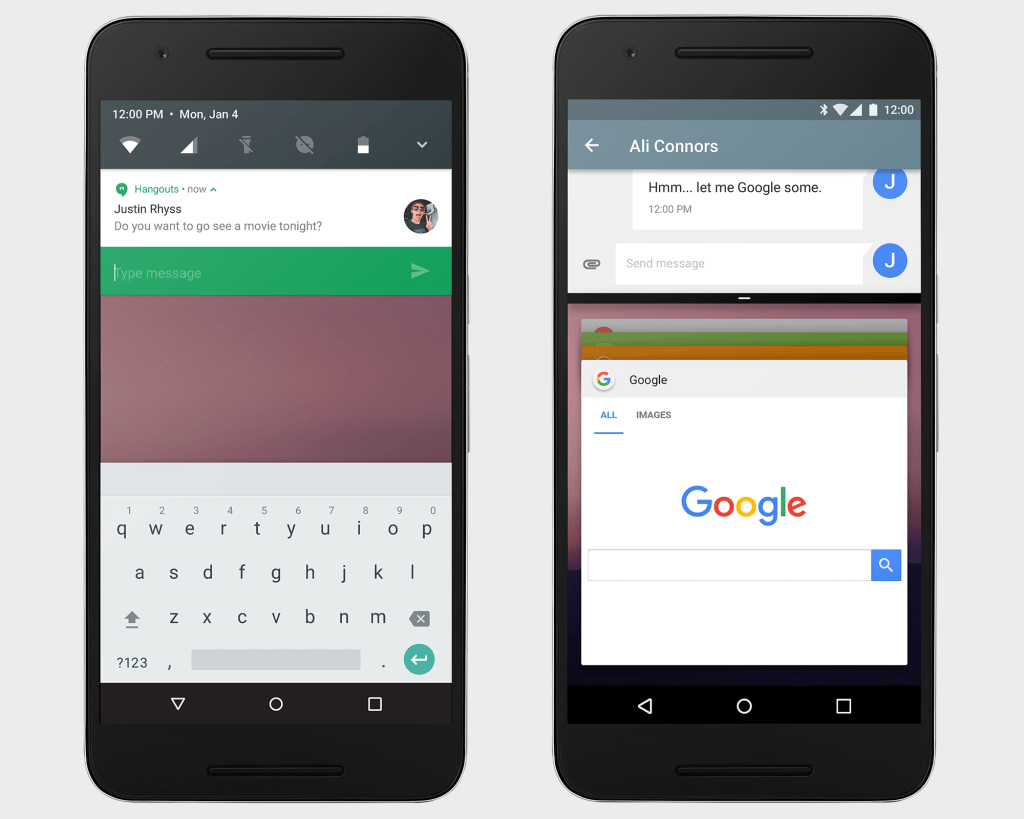
The upgraded software, known as “Android N” for now, offers a split-screen feature so users can toggle between apps more easily. Android N also enables users to reply directly to notifications, something already available on the software that Google makes for smartwatches running on Android Wear.
Another change is being made to reduce the battery power drawn by apps when the device’s screen turns off. Devices running on Android “Marshmallow,” a version released last year, shift into a battery-saving mode called “Doze” only when they’re stationary.
The new edition initially is being recommended only for mobile app makers and will only work on a few smartphones and tablets.
Google typically hasn’t released test versions of Android until its annual developers’ conference, which begins May 18 this year. The head start is designed to get Android N the hands of mobile device makers earlier than ever, according to a Google blog post , to give them more time to set up the new software on their latest models.
By the time phones running on the software hit the market this fall, Android N is expected to eventually be named after a sweet food beginning with “n” in the tradition of all the previous versions that Google has made.
Although other improvements could be added before the software is released to consumers later this year, Android N doesn’t appear to breaking any new ground. Both the split-screen and reply-to-notifications features, for instance, are already offered in the operating system running Apple Inc.’s iPhone.
The absence of a “gee-whiz” factor underscores the challenges facing the smartphone industry as its market matures and it becomes more difficult to come up with new ideas nearly a decade after Apple revolutionized mobile computing with the iPhone’s debut.
The decline in innovation extends beyond the mobile software to the devices themselves, reducing the incentive for consumers to buy new smartphones. That’s one of the reasons that Apple is bracing for its first-ever quarterly decrease in iPhones sales during the opening three months of this year.
Google doesn’t make smartphones, choosing instead to give away Android to device makers. The software is designed to highlight Google’s search engine, maps and other features, giving the company more opportunities to sell the digital ads that generate most of its revenue.
The strategy has established Android as the world’s most widely used mobile operating system, but it also has limited the amount of control that Google has over how the software is used.
That has turned Android into a fragmented system that has become a source of frustration Google. Among other things, about 56 percent of Android devices are still running on versions of the software that were released in 2013 and 2014, according to Google’s tabulations. Only 2 percent of Android phones are on Marshmallow, last year’s model.
In contrast, about 79 percent of iPhones are already running on iOS 9, the operating system that Apple released six months ago. Unlike Google, Apple exerts sole control over the software on its mobile devices.

Thursday, March 10, 2016

Google surprises with early preview of Android N


Google surprises with early preview of Android N

GOogle unexpectedly announced the Android N Developer Preview today. And to make things even easier for developers — and adventurous users — the preview is available as an over-the-air update.
The expectation was that Google wouldn’t start talking about Android N until itsI/O developer conference in May. Instead, it decided on a very different approach.
Hiroshi Lockheimer, Google’s SVP for Android, Chrome OS and Chromecast, writes on Medium today (yep, Medium and not Blogspot) that the team decided it wanted to release the preview earlier in order to get more feedback from developers earlier in the process and get the final N release into the hands of device manufacturers this summer. Google’scurrent plan calls for five preview releases and a final release in Q3 2016.
“As we look to the next release of AndroidN, you’ll notice a few big changes aimed at you as developers: it’s earlier than ever, it’s easier to try and we’re expanding the ways for you to give us feedback. We hope these changes will ensure that you are heard and reflected — that’s what makesAndroid stronger,” Lockheimer writes. He also notes that this early release will help developers add support for the new features in Android N.
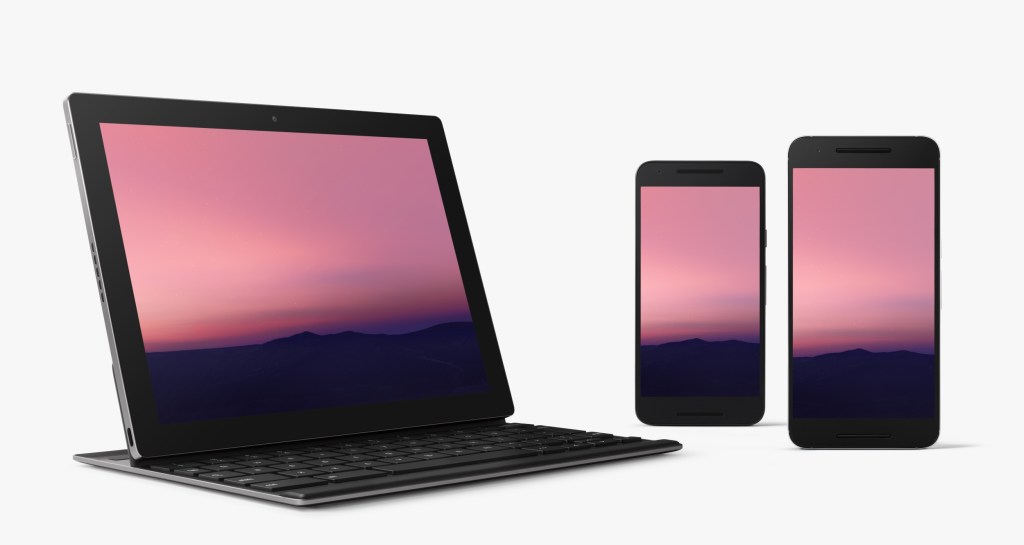
android-n-side-by
Google stresses that this release is very much a work in progress. Google will probably add a few more features over time, but for now, it is talking about just a few of the highlights of this new release (and chances are we’ll find a few more after we install the preview).
Among the changes in Android N are improved notifications. Using “direct reply notifications,” for example, means developers can now allow their users to reply to incoming notifications right from the notifications shade. Developers can now also bundle notifications from the same app together.
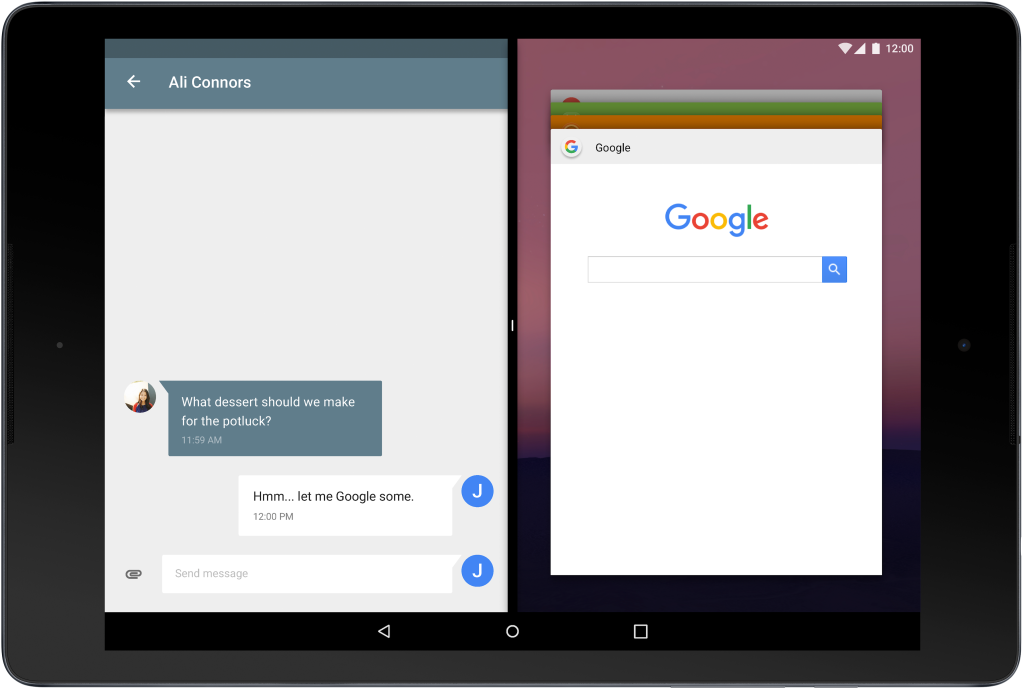
For the first time, Android will also offer a split-screen view. Apps that support this will be able to run side-by-side with other apps on both tablets and phones (and developers can set the minimum allowable dimensions for their apps). Multi-windows support is something users have long asked for — especially on tablets. Google’s own Pixel-C, for example, would make a far better productivity device with this feature.
Besides a basic side-by-side mode, Android N will also offer a picture-in-picture mode so video apps can play in the corner on Android TV devices, for example.
MultiWindow_DevBlog_Tablet_160308_01_N9

With Android Marshmallow, which is currently only running on 2.3 percent of Android devices, Google introduced its Doze feature, which puts a device into a deep power-savings mode when it’s stationary for a while.
In Android N, Google is pushing this concept a bit further by allowing Doze to also save more battery power when the screen is turned off. In addition, Google says it continues to work on making Android less memory-hungry and making apps that run in the background work more efficiently.
One other new aspect of Android N that developers can look forward to is improved Java 8 language support. Thanks to this, developers can now use the Android Jack compiler to use features like lambdas, which reduce the amount of boilerplate code they have to write.
This is available for all versions of Android from Gingerbread up, but Android N developers will also be able to use default and static methods, streams and functional interfaces.
N_Developer_Preview_Hero_WhiteBackground_resized
So how can you get your hands on Android N today? If you don’t mind things not working or randomly breaking, Google will let you sign up for an over-the-air (OTA) update (though as a Google spokesperson told us, that link won’t go live until later this afternoon). That is, of course, if you own a Nexus device.
The update is available for Google’s Nexus 6, Nexus 5X, Nexus 6P, Nexus Player, Nexus 9 and Pixel C devices. The one missing device here is the older Nexus 5. Once you’ve updated your device, Google will also continue to push new updates to it as they are released.
In addition to the OTA updates, Google will also continue to make system images for all of the supported devices and the Android emulator available.
Given that Marshmallow isn’t even on 3 percent of devices yet, it’s a bit of a surprise that Google seems to be in a bit of a rush to get Android N out. Chances are, though, that there are still a few more user-facing changes in this preview of Android N, as well, and that the next couple of releases will bring new features, too. For now, however, Google is putting the emphasis on just a few new features for developers.
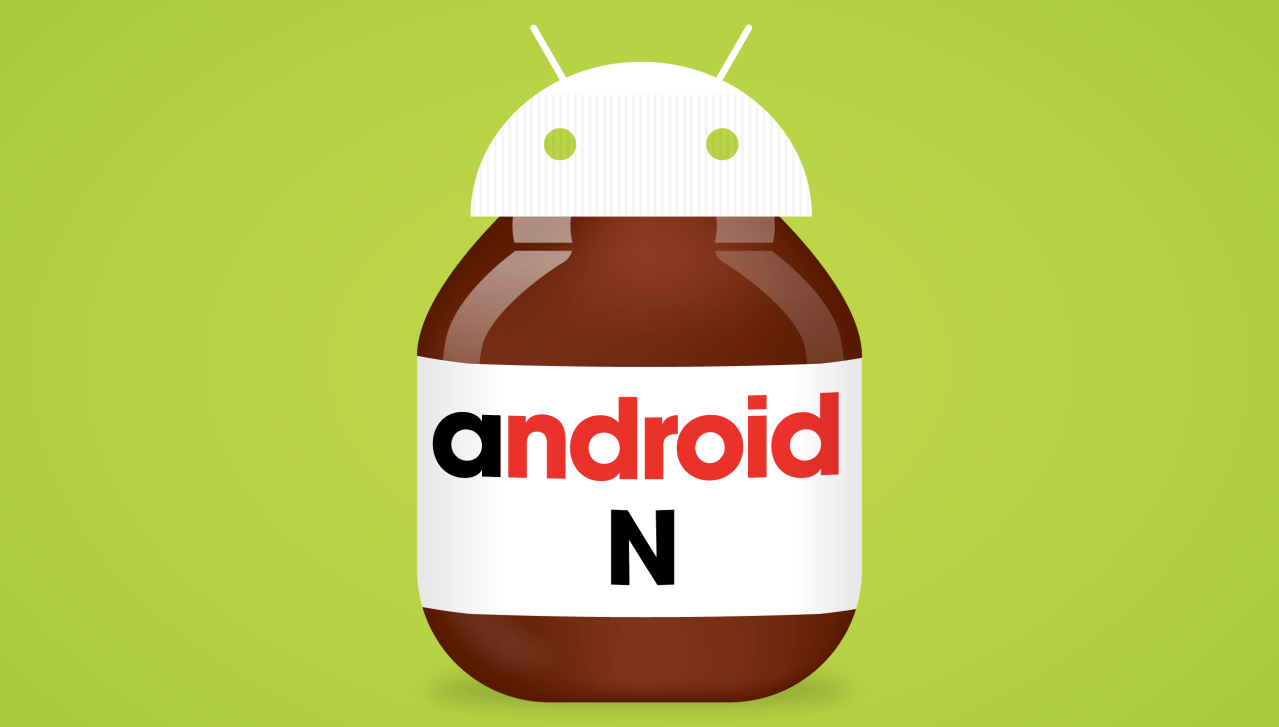
The one thing the company definitely isn’t revealing yet, though, is what dessert/candy that the ‘N’ will stand for once it releases the final version. I’m going with ‘Nutella,’ given that Lockheimer’s post says he’s “nut tellin’ you yet.”