Google is releasing the monthly security update for its Nexus Android devices today and with it, it is also announcing a list of the security vulnerabilities it has patched in this release. This month, the update includes patches for eight critical bugs, including one that affects the infamous libstagefright library, which has already seen its fair share of well-publicized vulnerabilities.
Google notified its partners about all the issues in this new bulletin two weeks ago and for them (and anybody else who is interested), source code patches will be made available through the Android Open Source Project in the next two days.
Google notes that the most severe of this month’s issues would have allowed remote code execution on an affected device “through multiple methods such as email, web browsing, and MMS when processing media files.”
The majority of the issues fixed with this update were first reported between late 2015 and February 2016. In total, this month’s update fixes just under 30 known vulnerabilities.
Nexus users should see an update for their phones pop up pretty soon. Now that at least a few other manufacturers are following Google’s lead in releasing monthly updates (or are at least promising they’ll do so), chances are they will also soon fix most of these vulnerabilities, too.
One of the great highlights for owners of Apple devices is when the iOS operating system is jailbroken by skilful developers. Yes there has not been a major new jailbreak tool release for any iOS-driven devices since October 2015, which has left many rebellious Apple fans disappointed. It is true that the Pangu Chinese team released such a jailbreak last month, but this was only for devices utilizing iOS 9.1; which would not be considered particularly valuable, and ultimately was viewed as an incremental update.
iOS 9.3 Jailbreak imminent
However, reports are brewing that the latest iOS 9.3 version will be jailbroken in the coming days, with numerous jailbreak enthusiasts apparently nearing a solution to this hallowed grail. 9.2.1 seemed likely to be released a few months ago, but Apple has instead announced a raft of exciting new features for the iOS 9.3 system, with Night Shift, enhanced 3D Touch shortcuts and an improved Notes application high on the list of developments.
It is thought that the Night Shift in particular may have led to jailbreaking teams delaying their particular software releases, but rumors are afoot that breakthroughs will be made in the next week or so. iOS 9.3 includes the largest palette of features that Apple will include in an operating system until iOS 10 is released, and this makes it a worthwhile escapade for jailbreaking crews all over the world.
However, the situation has been complicated by the fact that the latest iOS release has experienced significant teething troubles, and thus there is already an update available for this operating system, namely iOS 9.3.1. This is effectively a window of opportunity for jailbreaking teams, though, as there are early indications that the latest update is free of any major bugs. There is obviously no point in jailbreaking operating systems which then are updated, but it seems that 9.3.1 could be the last iOS released for some time.
Apple aficionados
With this in mind, analysts believe that a major jailbreaking tool is on the horizon in the foreseeable future, and this will be anticipated hugely by Apple aficionados. It is extremely common for people who have grown up with the Apple operating system to indeed jailbreak their iPhones and other iOS-driven devices, with the jailbroken handsets offering significant advantages and freedom over the standard iPhone releases.
Apple has strongly resisted the jailbreaking of its devices, and thus it has been asserted that the golden era of jailbreaking indeed seems to be over. Apple has attempted to neuter this process by offering frequent software updates for the iOS operating system, and this has certainly reduced the effectiveness of jailbreaking teams. While users can sidestep these updates by ensuring that the iPhones are not automatically updated, this does bring with it a host of potential issues, and it does not appeal to all iPhone owners by any means.
Nonetheless, there are massive advantages to jailbreaking iPhones, with the most obvious being that it enables users to customize and personalize the appearance of the operating system. To some degree, one can understand why Apple opposes this; it has built its reputation on a physical ubiquity which attracts people all over the world. But iOS is also frequently criticized for being a considerably more buttoned-down system than the competing Android OS, and many Apple users appreciate the ability that jailbreaking offers to customize the setup of the desktop.
Adding additional features
Jailbreaking also enables Apple users to add several additional features to their smartphone devices, and these can include genuinely useful functionality such as adding protection for any software or Touch ID.
Restrictions eliminated
Another criticism of iOS is that it imposes onerous restrictions on owners of its devices, and jailbreaking helps to mitigate against this issue. Of course, many Apple users never for one second consider such problems, but those who want the sleekness and convenience of the Apple iPhone, while also having a more open system particularly appreciate jailbreaks.
It is usual for links in iOS devices to be automatically opened in the Safari browser, while if you are opening a Maps application, it is not possible to open Maps in other apps. Jailbreaking devicesremoves all such irritating restrictions found in the existing iPhone system, enabling users to utilize and install whatever applications are required and desired. This is probably the number one reason for jailbreaking iOS, and it does remain an attractive proposition even for those concerned about the downside of jailbreaking.
More apps, more hacks
Finally, once a device is jailbroken, it is possible to install many applications that would otherwise be unavailable. Jailbreaking also opens up many hidden features in iPhone devices, and enables users to rummage around for hidden treasures and resources contained within the iPhone. For the technically proficient, jailbreaking literally makes the iPhone into an entirely new smartphone, and thus iOS users will be eagerly awaiting the latest jailbreaking release, which could now be on the cards.
" Math Game "is available for free for a limited time by Pixotri Technologies Pvt Ltd.
Math Game - A Game that improves your math skills and cognitive abilities Improve your math skills and cognitive abilities. The game will help kids and adults to improve their math skills in a fun way. Progress your arithmetic abilities from addition, subtraction, multiplication and division in a time trial environment.
Microsoft has held its dominance in the software market in part because it is the go-to provider for many business solutions. Word, Excel and Powerpoint are essential pieces of software across almost any industry, whether they are used for presentations and memos or tracking expenses and marketing products.
However, enterprise apps from competitors are growing in popularity, according toa new report from Okta, with apps and services filling gaps left by Microsoft’s products.
That doesn’t mean Microsoft is losing ground, though. In fact, Okta found that Google Apps and Microsoft Office 365 use overlaps at more than 40 percent of companies.
Okta, a company focused on verifying identities across devices, found that the average employee has access to between 10 and 16 cloud-based apps. Microsoft Office 365 is the most-used app, with Salesforce, Box, Google Apps and Amazon Web Services also making the top five.
Microsoft actually extended their lead over the past year. That may be, in part, due to the growth of Office 365 as the go-to way to licence apps like Word and Excel on mobile and desktop devices alike. And with more employees using mobile devices to get work done, they want the same access to Office apps as they have to things like Slack and Google Apps.
Office is also maintaining its dominance even as companies add Google Apps to their offerings, letting employees choose between Microsoft or Google options. It turns out that employees stick with Office apps for many projects they’re getting done on their own, but when collaborating they switch to Google products.
Email-killer Slack is also moving up quickly, with a 77 percent increase in adoption in the second half of 2015. For companies that use Slack, it is used widely throughout the organization. While Amazon Web Services are used by less than 10 percent of employees on average, Slack is in use by nearly three-quarters of employees at organizations that use it at all. That puts Slack behind just four apps (including Microsoft Office 365) in terms of saturation.
Okta’s report also found that, while plenty of new players are shaking things up in the cloud, legacy apps have managed the transition well. Microsoft, Adobe and SAP all more than doubled adoption of cloud-based tools. The real difference is how they grew, with Microsoft and Adobe growing their own products from scratch, while SAP and Oracle focused on acquiring companies that had proven success in the cloud.
It looks like an iPhone 5s but performs like an iPhone 6s
The good: Great battery life; fast performance; good camera; new features like Live Photos and Apple Pay at a cheaper price
The bad: Still expensive compared to some Android phones; 16GB of storage for the entry level model
Who should buy: People who prefer smaller phones (yes, those exist)
As mobile devices have become a more important part of our daily lives, they’ve grown in physical size too. Most popular smartphones come with screens that measure around five inches diagonally, now. Some companies, like Google and Samsung, have gone even bigger.
Apple is betting that not everyone wants (or needs) a big phone.With itsiPhone SE, Apple is reviving a more compact four-inch form factor that hasn’t been widely available since 2013.
Although the SE might look like an iPhone 5s, it’s certainly not built like one. The SE runs on the same A9 processor that powers the iPhone 6s and includes a 12-megapixel camera with support for Live Photos along with some other enhancements. It’s also priced much lower than Apple’s larger phones at $399 without a carrier subsidy or payment plan. (The iPhone 6 starts at $549, while the 6s has a base price of $649.)
Using the iPhone SE has made me remember how well-built Apple’s four-inch models are. The iPhone SE’s smaller design and boxy shape makes it easier to grasp without using a case, while the iPhone 6 and 6s sometimes feel slippery because of their rounded edges.
The biggest visual difference between the iPhone SE and iPhone 5s is its rose gold color option, but Apple has made some other more subtle tweaks too. The SE’s chamfered edges now have a matte look compared to the shiner aesthetic on the 5s, and the back of the phone has a stainless steel Apple logo. The SE doesn’t feel like a cheaper iPhone. It feels like a premium device, that just happens to be smaller in size.
Apple calls the iPhone SE “the most powerful 4-inch phone,” a seemingly accurate claim since four-inch phones are increasingly hard to find. But since the SE runs on the same processor as Apple’s latest flagship, it can also keep up with larger more expensive smartphones. For example, the iPhone SE was able to load games like Dead Trigger 2 and launch its camera just as quickly as Samsung’s Galaxy S7, even faster in some cases.
It’s really the SE’s battery life that impressed me the most. After a full day’s worth of use, which included a mix of browsing the Web, checking Facebook, streaming Netflix, playing graphics-intensive mobile games, and occasionally turning on Bluetooth to pair accessories, the phone still had about 50% battery left.
Apple has also packed the SE with some other goodies from the iPhone 6s, including its 12-megapixel camera, the ability to shoot Live Photos, and a Retina flash for the front-facing camera. Photos taken on the iPhone SE looked vibrant and were slightly more colorful than those taken on the iPhone 6’s 8-megapixel camera and Galaxy S7’s 12-megapixel camera in some cases.
All three phones captured what essentially looks like the same image, but if you look closely at the photos below you’ll notice the one taken on the SE shows bolder colors in certain spots. For example, the green rooftop in the distance is more pronounced in the SE’s photo than those taken on the two other phones.
iPhone SE
Lisa Eadicicco
iPhone 6
Lisa Eadicicco
Galaxy S7
Lisa Eadicicco
The iPhone SE isn’t great at capturing images in low-light conditions without the flash turned on. However, it does seem like the color accuracy has improved compared to the iPhone 6, since you’ll notice the cat’s fur looks more white.
iPhone SE
Lisa Eadicicco
iPhone 6
Lisa Eadicicco
Galaxy S7
Lisa Eadicicco
The SE’s front camera is much better at taking photos in dim areas. The SE has a 1.2-megapixel camera like the iPhone 6, but comes with Apple’s Retina Flash technology, which prompts the screen to function as a camera flash in dark situations. The front camera has a lower-resolution than more expensive flagships like iPhone 6s and Galaxy S7 (both have 5-megapixel front cameras), so expect to see a little more noise than you might with Apple’s pricier phone.
That said, the SE is leaps ahead of the iPhone 6 when it comes to taking low-light photos with the front camera. Take a look at the difference below:
iPhone SE
Lisa Eadicicco
iPhone 6
Lisa Eadicicco
Plus, the SE supports Live Photos, which captures the moments just before and after the photo was taken to create cute clips like this:
Lisa Eadicicco
To be clear, the iPhone SE isn’t really meant to compete with high-end smartphones like the Galaxy S7 and iPhone 6s. Apple is positioning the SE as a way to make the iPhone experience more accessible to those who prefer smaller phones and may be shopping on a tighter budget, and it succeeds at that. I only decided to test the SE against the Galaxy S7 in a few cases because certain hardware aspects are similar to what you might get in a more expensive phone, like its processor and camera. At the same time, I wanted to demonstrate some of the differences between the SE and iPhone 6’s older hardware.
The iPhone SE is a Apple’s most affordable iPhone, with the 16GB model selling for $399 unlocked. The downside, however, is that you can’t upgrade the amount of storage in the iPhone like you can with some inexpensive Android phones. That means if you want more than 16GB, you have to pay $499 instead of $399. The cheaper OnePlus X, for example, also comes with 16GB of space but supports expandable storage up to 128GB. Other low-cost phones, like Motorola’s Moto G, allow you to upgrade storage as well.
There are tradeoffs to be considered whether you choose the iPhone SE or a low-cost Android phone. At $249, the OnePlus X is a little more than half of the price of the 16GB iPhone SE, and offers some impressive features (a clean Android experience, expandable storage, high-resolution front and main cameras, and a sharp 1080p screen). But it lacks certain other special features found on the SE, like a fingerprint sensor, NFC support for mobile payments, and 4K video recording. Plus, its 5-inch screen is likely too large for those who are truly looking for a phone that’s physically similar to the iPhone 5s.
Recently, Microsoft released the Build 2016 app for Windows 10 devices. Today, the company also released the Build 2016 app for Android and iOS. The Android and iOS app for Build 2016 seem to include all the features as the Windows 10 app, which is definitely good news:
My Schedule: Access and modify the list of sessions, speakers, and exhibitors that you have added as favorites in the app or on the conference website Schedule Builder
Schedule Builder: View and search the full conference session list. Select a session to favorite it, view details, submit session evaluations, and take notes.
Showcase: Find the Microsoft groups and partners you want to meet.
Conference Info: Find important event information and read about key event highlights to enhance your on-site experience.
Maps: Find your way around the venue.
Social & News: Follow and join the conversation through our social channels
The mobile operating system Apple launched last week is suffering from another glitch that causes iOS-based devices, including the iPhone and iPad, to freeze, according to reports on Apple’s Support Forums and tweets to the company’s Support team.
A forum post last week from one iPhone owner said that when attempting to click a link to Google GOOG-0.24%from Apple’s AAPL-0.42% built-in browser Safari or email app Mail, “the apps just freeze.” The person added that nothing fixed the issue, including restarting the phone. Soon after, several other Apple users reported suffering from the same problem.
“I’m having the same issue in every app that has a link to open Safari,” one poster wrote. “I was in the beta and this never happened; it was more stable then (sic) the public release.”
A video was also published over the weekend showcasing the issue in action.
It’s unclear at this point exactly what is causing the issue. An earlier report in TechCrunch, which discovered the growing Apple Support thread, pointed to some complaints that the issue could have to do with an iOS 9 feature called “Universal Links.” The feature allows app developers to force links to open directly within their programs instead of Apple’s Safari browser.
Some users in the forums, however, have said that when they disable JavaScript, a computer language used by Apple’s apps, it fixed the problem.
Whatever the case, it’s just the latest glitch to affect Apple’s newest operating system launch.
Last Monday, Apple announced that it was launching iOS 9.3 to its iPhone and iPad users. The version was previously in beta for months, suggesting that Apple was working with developers to get the issues worked out. However, soon after, users started complaining about the latest version of Apple’s operating system. For instance, some users with older devices couldn’t even update to iOS 9.3 if they didn’t remember their passwords. Unless they tried a workaround, including changing their passwords through Apple’s iCloud.com, their devices would be rendered useless.
For its part, Apple acknowledged that issue, saying that it was working on a fix to address the activation error. The company last week patched the problem on the iPad 2, but said it would launch a software update to other iOS devices in the near future.
The issue was a bit of a black mark on an otherwise notable upgrade that includes support for new Night Shift feature that automatically adjusts the screen’s brightness to make it easier on the eyes at night. The app also includes improvements to Notes, News, and other features.
Still, users aren’t happy with an operating system that had been in testing for so long. And they’re now hoping Apple will fix this latest issue that—at least for some people—has stopped links from working.
Apple did not immediately respond to a request for comment on the glitch. However, a forum poster claims to have spoken to Apple Support, which said it was aware of the issue “and that their engineers are working on an update.”
The person added that Apple Support thought “the update should arrive within the next two days.”
As Apple has continued to make the iPhone thinner and thinner with each passing generation, many users have voiced the opinion that they’d much rather have a thicker device with a bigger battery than a device on the verge of becoming impossibly thin. While Apple has undoubtedly increased the iPhone’s battery life over time, those advancements typically accompany a new form factor that allows for a bigger battery.
When Apple maintains the same form factor across generations, the leaps in battery life are more subtle. For instance, the battery life for video playback, Wi-Fi usage, audio playback, and 3G Internet usage on the iPhone 5 and iPhone 5s are exactly the same.
With the leap from the iPhone 6 to the iPhone 6s, Apple did make a number of more noticeable battery life improvements, but many users still find themselves having to juice up more frequently then they would like.
With this as a backdrop, one has to wonder if people complaining about iPhone battery life is just a fact of life or if battery technology will ever advance to such an extent that complaints about battery life seem like a relic from a bygone era. Might we see a time in the near future where iPhone battery life is measured in days and not hours?
Tackling this issue, Dee Strand, the Chief Scientific Office at Wildcat Discovery Technologies, recently sat down for a Reddit AMA where she asked readers to ask her anything (anything at all!) about lithium ion battery technology.
Of course, it didn’t take long for someone to ask a question about the iPhone.
The posed question reads: “All I want to really know is when do you think my iPhone will be able to go a good 2-3 days of actually heavy daily use days before needing to be charged.”
Strand responded:
I love this question. First of all, I am not addressing any particular cell phone company or model – all answers are general trends. The answer may be never – as the definition of “heavy daily use” means many things. With every improvement in the battery, the cell phone company wants to add more features (and so do you – consumer demand drives more features). Bigger screen, brighter display, more apps, touch screen features, etc. All those great features are designed to work such that your phone can (hopefully) last a day with recharge overnight. The batteries will continue to get better, but the phone will continue to to [sic] get even better. Your current cell phone battery can last several days if you don’t use many of the features. On the other hand, if you really do have “heavy use,” it would be difficult for any phone to guarantee several days of charge.
It’s an interesting and rather astute answer. In fact, we’ve already seen it play out before on previous iPhone models. Battery technology isn’t stagnant, but it does move forward at a relatively measured pace. Over the years, as battery technology has improved, Apple has adorned the iPhone with more and more battery-draining features, from LTE support to the Retina Display originally introduced on the iPhone.
Looking forward, it stands to reason that any leaps in battery technology may be completely offset by crazy new technologies Apple incorporates into future iPhone models. If Apple strongly believes that 10-12 hours of usage is reasonable before needing to recharge, it’s a safe bet that Apple will focus more on the user experience than on squeezing out 2-3 days worth of battery life.
It’s important to note that multi-day battery life isn’t some far-fetched notion. Indeed, if battery life was the deciding factor in smartphone ownership, the Motorola Droid Turbo 2 would be the most popular device on the market.
Google and Apple like to keep you safely inside the walled gardens of their respective app stores, but vaulting over those confining walls is actually pretty easy — as long as you know what you’re doing. In this guide, we’ll walk you through exactly how to install unauthorised applications in process otherwise known as sideloading.
First of all: You should know the risks. Apps only need to be sideloaded when they aren’t officially approved by Google or Apple, and that means you’re throwing away all the safety and security their respective approval provides. You need to be very, very sure you trust an app before you allow it on your phone, otherwise you could expose yourself to hacking or phishing threats.
So why is sideloading important? Sometimes you might want to install an app that doesn’t meet the rules of iOS and Android; or you might want to join a beta test where only unofficial app packages are available. Most users will never need to sideload an app in their lives, but it can be a handy trick to know.
It’s worth repeating though that you should do this at your own risk — you’re giving the virtual bouncers employed by Apple and Google the night off and running security yourself. Only sideload an app if you’re 100 per cent sure it’s not going to do anything untoward with your data or your device.
Android
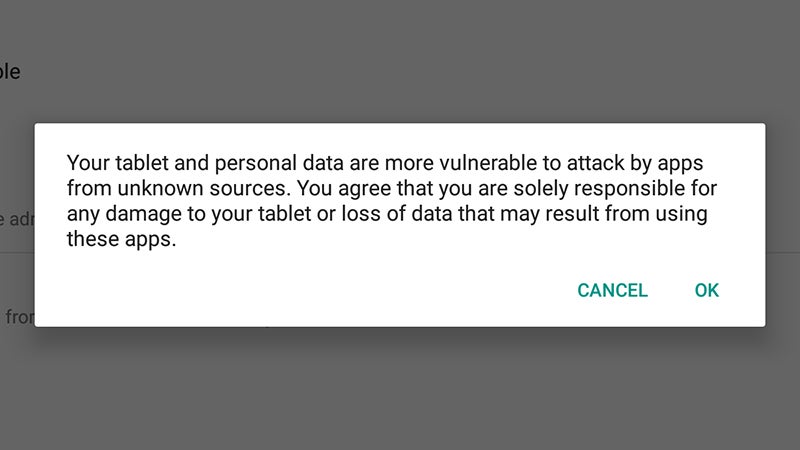
Sideloading is slightly easier on Android. First, you need to tell the operating system that you’re prepared to allow unauthorised apps on your device (apps from “unknown sources” in official parlance). Head to Settings then tap Security and toggle the Unknown sources switch to On.
With that done, you simply need to get an APK (Android Application Package) on your device in whatever way you prefer: you can download it from the web, transfer it via USB, use a third-party file manager app, and so on. Just be very sure you get it from a reputable source, as even genuine APKs can be bundled with unwanted extras.
Launch the APK using your app or file manager of choice and once you’ve tapped through the standard warning message the app installs itself — from this point on you can use it (and uninstall it) as normal. In most cases the app will auto-update itself as well, although this can vary.
iOS
To sideload apps on iOS you need to take advantage of a recent change to the Xcode software. For the uninitiated, Xcode is a free developer app available through the Mac Store. Installing unauthorised apps is a more involved process than it is on Android, and it comes with a few more limitations.
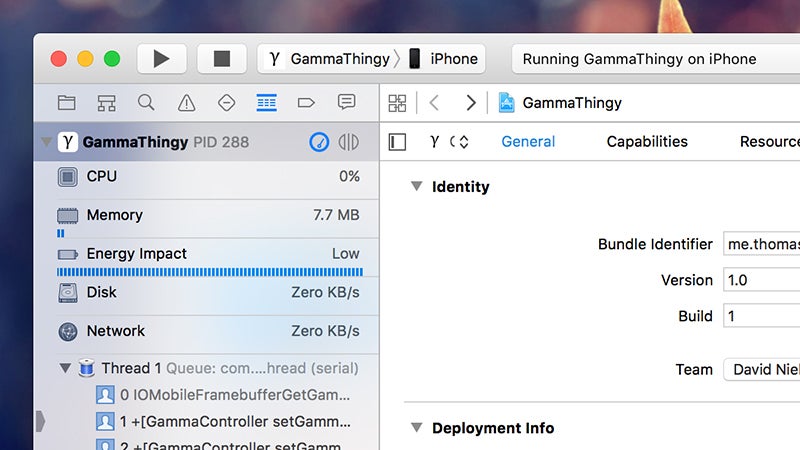
Once Xcode is safely installed on your device, add your Apple ID details under Accounts in thePreferences dialog (in the Xcode menu). You then need to obtain the source code for the app you want to install in iOS: it could be a Game Boy Advance emulator, a display tweaking utility or a weighing app.
Depending on the app, you might need to do some preparatory work, but if a developer is making the source code available then you’ll usually find basic instructions included to get it into a form that Xcode can recognise. Use File then Open to open up your app, and select the project on the left.
Connect your iOS device, then from inside Xcode choose Product, Destination and select your device. Give the package a unique name in the Bundle Identifier field (under the General tab), make sure your Apple ID is selected as the team name, and you’re just about good to go.
Click the Run button (top left) to compile, load, and run the iOS app on your device. It’s not quite as straightforward to follow as the Android approach, and may require some extra work, but it’s worth trying for those apps you really want to on your iPhone that aren’t listed in the app store.
iPhone owners are reporting a mysterious bug in Safari after updating to Apple’s latest iOS 9.3 release. Some are finding that the browser freezes and crashes when they tap links on a webpage, and must be force-closed.
The issue is primarily affecting iPhone 6s and iPhone 6s Plus owners, according to 9to5Mac — but has been experienced on older iPhones and some iPads, too. It is only appearing under the latest iOS 9.3 update that was rolled out last week.
Although the problem occurs mostly in Safari, it can also happen when opening links in other apps, including Messages, Mail, and Notes. Instead of taking users to a webpage, the app freezes and crashes, and must be force-closed from the app switcher.
In some instances, tapping the link does nothing at all, whereas tapping and holding causes the crash. The video below demonstrates the issue.
Apple is yet to respond to this problem, which hundreds of users have reported on its official Support Communities forum, and on social networks. Some say disabling JavaScript helps in Safari, but the problem persists in other apps, and there is no workaround just yet.
Apple has already had to rollout a second iOS 9.3 update after the original starting bricking older iPads, leaving users unable to activate them. Here’s to hoping there’s another fix for this issue soon.