Showing posts with label apple updates. Show all posts

Saturday, February 6, 2016

Error 53: Latest iOS Update May Brick Your Phone If You Did This


If you've had the screen or home button replaced on your iPhone and the work wasn't done by someone at the Apple Store, you may want to skip the latest iOS update.
Apple's iOS 9 update has a little-known feature that will render your iPhone 6 and 6 Plus about as useful as a brick if you've had it repaired by anyone but an Apple technician.
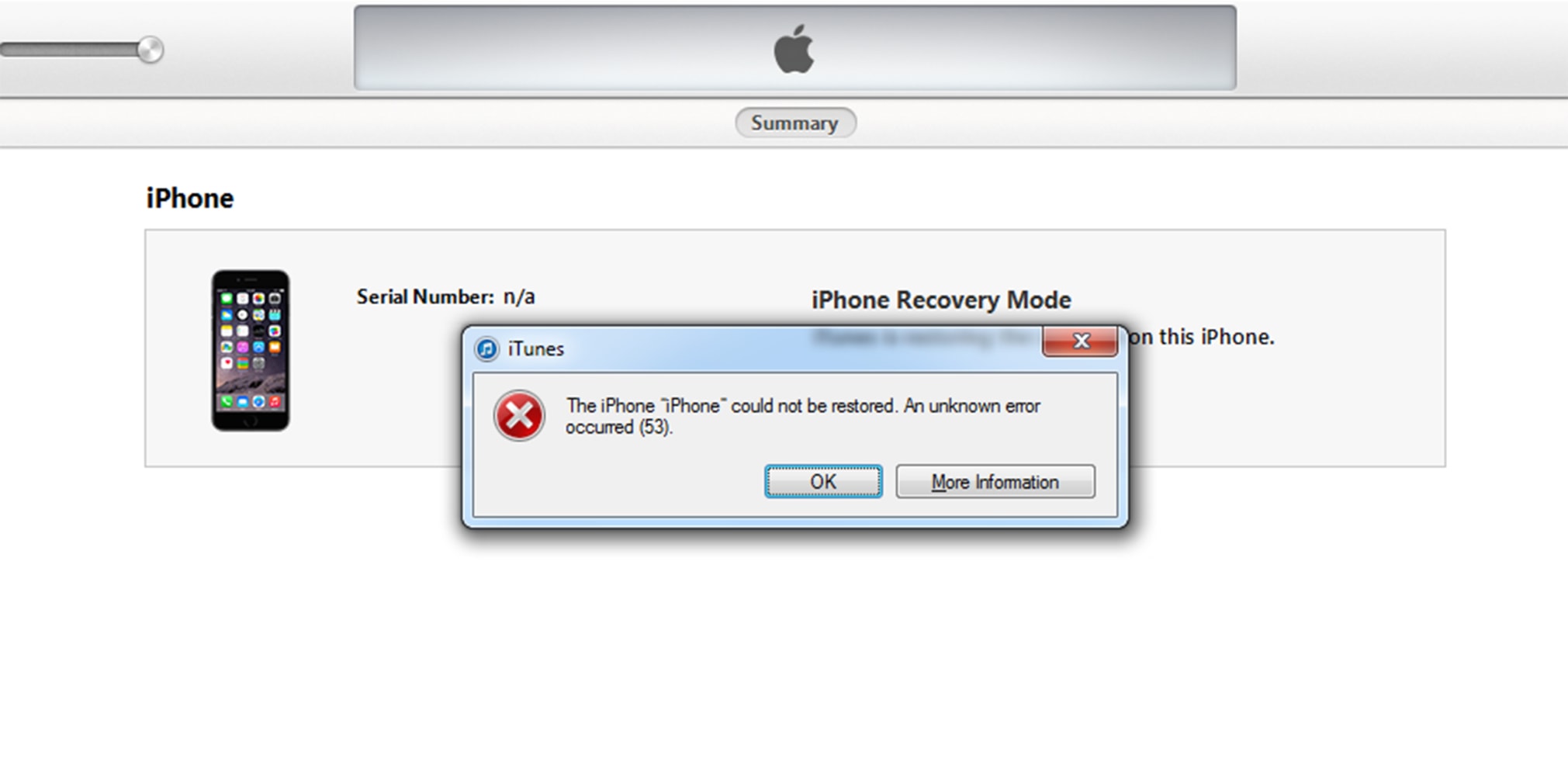
There are numerous accounts online from users who have had their screens or home buttons repaired by a third-party, and when they try to upgrade their software, the update gives an error message that reads: "The iPhone '[device name]' could not be restored. An unknown error occurred (53)."

Image: Iphone Error

iphonehelping.com

Needless to say, iPhone users who receive this message are frustrated.
"Bricking [disabling] the phone so that you can't even recover the photos on it is ridiculous. Imagine, for example, you go on honeymoon to somewhere really pretty that doesn't have an official Apple store. You take some pictures of you and your beloved with your iPhone. Unfortunately you drop it, and break the home button. You get it fixed at a local repair place and take a few more gorgeous photos. Then the phone updates and [...] YOU GET NOTHING," user iey404 said on Reddit.
"I work for a company that repairs iPhones and we refurbish thousands of iPhone 6. We have tried everything under the sun to get around this error but it is simply not possible. If someone brings in an iPhone 6 for repair and the home button is damaged in any way, we tell them up front the phone is unrepairable and we won't take it," user Facebomb Wizard also said on Reddit.
Jenna Burdett, who runs a website called iPad Rehab, fixes Apple devices for a living and blogs about it. She posted a YouTube video titled "iPhone6 Error 53 Solutions." In it, she says the iPhone's Touch ID sensor inside of the home button is married to the CPU on the motherboard, which means you can't take a home button from one phone to another and retain the Touch ID function.
"If you had your screen replaced and the shop that replaced it for you did no keep the original home button, that's where the problem comes in."
"There is no amount of restoring that will clear error 53 to get rid of it — you have to have the original home button," Burdett said.
Some observers have speculated that Error 53 is the company's way of imposing a monopoly on repairs. Others say it could be Apple's way of trying to prevent theft of your data after security is tampered with. 
Until now, Apple's only official statement on the issue has been that the issue is real and that it is due to security for fingerprint data that relates to Touch ID. But in a statement to NBC Friday, a company spokesperson said, "We take customer security very seriously and Error 53 is the result of security checks designed to protect our customers. iOS checks that the Touch ID sensor in your iPhone or iPad correctly matches your device's other components. If iOS finds a mismatch, the check fails and Touch ID, including for Apple Pay use, is disabled. This security measure is necessary to protect your device and prevent a fraudulent Touch ID sensor from being used. If a customer encounters Error 53, we encourage them to contact Apple Support."
Apple's statement suggests this is the price iPhone users must pay to secure their fingerprints, which can provide access to a slew of sensitive data.
If you've encountered this problem and your phone is still under warranty, your best bet is to visit an Apple store and give them your phone to be repaired. They have special software to pair the home button with the motherboard, and can fix the error. 

Monday, November 30, 2015

Apple Ready To Gamble On New iPhone Technology


Not content with the 3D touch interface that was added to the iPhone 6S and iPhone 6S Plus screens, Apple looks set to move to a new screen technology in 2017′s iPhone.

There has been a consistent build up of leaks, rumors, and suggestions from the supply chain that a switch away from the LCD technology currently used by Apple for its iPhone screens is on the cards. Moving to OLED screens would allow for more power efficient displays that have a wider viewing angle, better color reproduction, and a more vibrant display. Apple has been reluctant in the past to make this switch because of worries around the lifespan of OLED screens.

iPhone 6S and 6S Plus (image: Apple PR)

Apple must be confident that these issues are now answered (presumably with technology along the lines of that detailed in its patents using photodiodes and varying the anode pitch in OLED screens). Nikkei Asian Review (via Patently Apple) is reporting that Apple has notified its supply chain of the upcoming switch to OLED for iPhones released in the 2017/2018 smartphone season.

This would point to the adoption of OLED screens for the presumptively tilted iPhone 7S. Going with the 7S as the debut handset makes a certain amount of logistical sense. The external design cues of the iPhone are generally updated in even-numbered years with the cardinal numbered iPhone models, while the internal technology and specifications tend to favour the iPhone ‘S’ models.
That is illustrated in the latest models from Cupertino. The iPhone 6 introduced the new design with the curve edges and taper on the screen, the change in size from 4 inches to 4.7 and 5.5 inches, and the thinner design. The hardware changes that included the addition of 3D Touch, increased memory, and a larger camera sensor, were all seen on the iPhone 6S.

This is obviously not a hard and fast definition, more a rule of thumb, but it gives each team a two-year development cycle between handsets to implement the changes. Given the 6S has just seen a notable change in screen technology with 3D Touch, the idea that the next change will happen in twoi years time, on the iPhone 7S, makes a lot of sense from a logistical point of view and fits in with Apple’s previous rollouts of new hardware and technology.

Tuesday, November 17, 2015

3 Improvements That Apple Inc. May Bring to the A10 Processor Next Year


We predict some of the enhancements that Apple might bring to its next-generation applications processor.

Ip
APPLE'S LATEST IPHONES. IMAGE SOURCE: APPLE.

With the Apple (NASDAQ:AAPL) A9 processor essentially a known quantity thanks to the various performance tests and tear-downs that have hit the Web over the last month or so, it's now time to look ahead to what Apple might do with its next-generation A10 processor, and in this article I'd like to put forth a couple of educated guesses about what I expect Apple to do with this chip.
Higher frequencies thanks to TSMC's 16-nanometer FinFET PlusIt is well known at this point that the A9 manufacturing contract is split between TSMC(NYSE:TSM) and Samsung (NASDAQOTH:SSNLF). This information was first reported by theChina Times and has been verified in a number of other reports (I confirmed this information with a source I believe to be reliable, and famed KGI Securities analyst Ming-Chi Kuo independently reported the same).
At any rate, I am told that in terms of transistor performance, TSMC's 16-nanometer FinFET Plus is superior to Samsung's 14-nanometer LPP process (Apple is building the A9 on both).
Given that the TSMC process is the better-performing one, and given that Apple doesn't have to worry about making sure the A10 can be manufactured to specification on the Samsung process (i.e., a "least common denominator"), I think Apple will be able to realize a "freebie" increase in CPU/graphics core frequency as a result of building the A10 on a more mature, intrinsically higher-performing 16-nanometer FinFET Plus process.
Support for much greater memory bandwidthThe A9 chip's memory controller supports LPDDR4-3200 memory, which gives the system-on-chip an effective memory bandwidth of 25.6 gigabytes per second. Since I believe that Apple will want to significantly improve the graphics performance of the A10 over the A9 (more on that later, though), I think it will want try to realize a big boost in memory bandwidth (i.e., the rate at which data can be transferred between the system-on-chip and system memory).
Fortunately, this should be fairly straightforward for Apple to achieve. Samsung(NASDAQOTH:SSNLF) recently announced that it had begun mass production of LPDDR4-4266 speeds. This, as the memory giant notes in its press release, is a whopping 30% faster than the current LPDDR4-3200.
In a dual channel configuration, the A10 should be able to realize memory bandwidth of 33.28 gigabytes per second using this faster memory. This significantly increased memory bandwidth should allow Apple to scale up the performance of the rest of the SoC and worry less about bandwidth limitations.
More memory bandwidth means beefier graphics?In AnandTech's review of the iPhone 6s, the reviewers noted that one of the reasons that Apple didn't move from a four-core graphics configuration to a six-core configuration until the A9 was due to the fact that the previous A-series chips were fairly bandwidth constrained.
If Apple goes ahead and uses this significantly faster memory as I expect it to, there could be room for Apple to upgrade the graphics configuration in the A10 from a six core PowerVR Series 7 design like the one in the A9 to an eight core Power VR Series 8 design.
Not only would Apple be able to deliver increased graphics performance by virtue of the architectural enhancements in a next-generation PowerVR GPU (or potentially even a custom Apple-designed GPU, since it is well-known that Apple has been working on one for quite a long time), but the additional cores would also help provide extra oomph.
This additional graphics performance will be especially important if Apple decides to increase the display resolutions on its next-generation iPhone 7/7 Plus phones, a move that is, quite frankly, a distinct possibility. Indeed, I suspect one of the reasons -- beyond additional power draw -- that Apple has been hesitant to move to even higher resolutions is that it wants to make sure that 3D games run well at the native resolutions of its devices.

Tuesday, June 16, 2015

iOS 9’s Notes App vs Evernote: Can A Revamped Notes Take On Evernote?

Apple has completely revamped Notes inside iOS 9, here we take a look at how it compares to the mighty Evernote

In 2001 a company called Karelia released a piece of software for OS X called Watson that allowed users to search for information on various websites on the Internet without using a web browser. Watson quickly became a user favorite on the Mac platform–that is, until Apple introduced Sherlock 3 in 2002, which seemed to “borrow” heavily from Watson. Ever since then the term “Sherlocking” has been used whenever Apple adds features to its operating systems or apps that heavily borrow from popular third-party apps.


With iOS 9 and OS X El Capitan it appears Apple is Sherlocking once again with the introductions of the all new Notes app. There are many who have said that the new Notes will be an Evernote killer. But are they really that similar? We take a look to find out.  

Notes vs Evernote: Features

Lets start with the new Notes app in iOS 9. Notes is getting a huge overhaul in iOS 9–which is good, because the app has hardly been updated since the first iPhone. Now in Notes in iOS 9 you’ll be able to easily create a checklist right in a note. This is a godsend for those people that use Notes to create a list of things to do–although, that’s kind of what Reminders is for too. But now in Notes users will be able to make a list and turn it into an interactive checklist with just a few taps, then check off those items at will.

Notes in iOS 9 also allows you to add a photo, a map, or a URL directly into a note and see it formatted in-line. By this I mean is that you can drag in a web URL and that URL will appear with a box around it with a thumbnail image and a description of the URL. Map addresses and directions get a similar look.

Another really nice feature of the new Notes app is the ability to use your finger to sketch your thoughts down. The new Notes app offers a variety of brushes and colors–as well as a ruler to keep your lines straight–so creating sketches in Notes is a breeze.

Moving on to Evernote…it’s a bit tricky to compare Evernote directly because there are three different versions of it: Basic, Plus, and Premium. Only Basic is free–as is Notes–so lets look at that version first.

In Evernote Basic you can take notes and create lists in them and then turn those lists into interactive to do lists you can check off when done. You can also save URL and other clips from the web directly into a note. So far, both Evernote Basic and the new Notes app have similar features. But Evernote Basic does have one big advantage: it allows you to share and discuss your notes with other Evernote users via the app. This is a HUGE feature for those that want to collaborate.

The drawback to Evernote Basic is that you need to have an Internet connection to read your notes, so if you’re on a plane and your Notes haven’t cached, you’re out of luck. However, that limitation goes away with Evernote Plus, which also add the ability to save emails into Evernote and set a passcode to keep your notes secure. Then upgrade to Evernote Premium and get the ability to turn notes into presentations, scan business cards, annotate PDFs, search through attached Office documents and PDFs, and get unlimited note uploads.

Notes vs Evernote: Platforms

The new Notes app will be available on iOS 9 devices (iPad, iPod touch, and iPhone), OS X El Capitan Macs, and via the web on iCloud.com.

Evernote is available on iPad, iPod touch, and iPhone, Android devices, Macs and PCs, Blackberry, Windows Phone, and Amazon devices.

Notes vs Evernote: Price
Notes is free. It comes as part of iOS 9 and OS X El Capitan.

Evernote Basic is available for free. However, upgrading to the more advanced features of Evernote Plus will cost you £19.99 a year. Going all out and upgrading to Evernote Premium will cost you £34.99 a year.

Notes vs Evernote: Verdict

If you just need a simple note taking app and collaboration isn’t important to you, then iOS 9’s and OS X El Capitan’s new Notes app is going to be all you need. It’s a beautiful looking app with deep OS integration and one that anyone could learn how to use in a matter of minutes. For 95% of users out there, Notes will be more than enough.

However, if you’re a notes power user and find collaboration or the ability to annotate PDFs, search through attached documents, and scan business cards are important to you then Evernote is the clear winner. However, be aware that with the exception of collaboration, all those extra features are going to come with an annual cost of either £20 or £35. Evernote also wins on the platform front. It’s available for all smartphones and desktops. If you use multiple devices (say a MacBook and an Android phone) then only Evernote is going to work for you.

For business users, the advanced features of the paid tiers of Evernote–as well as its multiplatform support–may be enough to justify the subscription costs. But for your average user who just wants to record simple notes and save simple items to them the new Notes app from Apple will be more than enough.

Monday, June 15, 2015

iOS Leak Reveals 'Massive' New Apple Device

Massive leaks are now common for every technology company, no matter how secretive. But it isn’t often that the leaks are literally for something ‘massive’…

And yet this is exactly what app developer Steve Troughton Smith discovered buried deep inside Apple AAPL -0.19%’s iOS 9 preview: a iOS keyboard specifically designed for a much larger device than anything that currently exists.


How big? Right now it is impossible to say, but the keyboard can only be seen by using developer tools to set a virtual screen size in excess of even the iPad Air / iPad Air 2’s 9.7-inch 2048 x 1536 pixel display. This means an iOS device closer to the size of a laptop than a tablet.

Read more – Apple iOS 9 Vs iOS 8: What’s The Difference?

#iPadProConfirmed

Mischievously Troughton Smith uses the hashtag #iPadProConfirmed with his discovery and this does seem the biggest likelihood. Much like the iPhone, iPad and Apple Watch, a large ‘iPad Pro’ with a screen of 12.85 inches has been rumoured for a number of years.

But could all this be coincidence – perhaps a glitch in Apple’s iOS 9 beta software?


It seems highly unlikely. For starters the larger iOS keyboard has specific changes to capitalise on its bigger size. Most notably several enlarged buttons, additional function keys like redo and tab and a whole new narrow numerical row which can be toggled between numbers and symbols. So that would be some accidental coding error.


Furthermore Apple has history here.

Bigger iPhone Leaks

The beta of iOS 6 actually had a preview of a larger iOS keyboard for the then-unannounced jump to a 4-inch display with the iPhone 5. iOS 8 betas also had key UI elements at higher resolutions in preparation for iPhone 6 and iPhone 6 Plus.

So could this be Apple potentially milking some free publicity? It’s possible, but I think it is equally likely that the company wants developers to have time to quietly test their apps at larger resolutions. Of course it may well be both – which is a win/win.

So when can we expect a possible iPad Pro to launch? There are obvious clues…


Sunday, June 14, 2015

WWDC Puts Accessibility On The Radar For Developers

That’s Apple’s slogan for this year’s Worldwide Developers Conference (WWDC), and it resonates with me in a special way.

Event after event, Tim Cook makes a point to remind the audience that Apple’s ethos is to build best-of-breed products that change people’s lives. I believe Cook to be sincere for no other reason than the work the company does in supporting accessibility. In iOS and OS X. Apple has made good on their word to changing people’s lives by continually improving the tools that, quite literally, change the way a person with disabilities (such as myself) uses an iPhone and iPad.


But it isn’t only Apple who’s doing good. Third-party developers have a responsibility to incorporate accessibility into their apps as well, and that’s where WWDC comes in. Apple provides numerous resources to developers during the conference that help he or she ensure that their app(s) are as accessible as possible.

The accessibility presence at WWDC is deep and far-reaching; Apple does much to raise awareness of and advocate for the accessibility community. Apple this week granted me behind-the-scenes access to sessions, labs, and developer interviews at Moscone so as to tell WWDC’s accessibility story.

Sessions

Arguably the most important aspect of WWDC from a developer perspective are the sessions. This is where Apple engineers present information about APIs and demonstrate how developers can integrate them into their apps. As there are sessions dedicated to things like user interface design and privacy, so too are there ones for accessibility.

Sessions are helmed by a member of the respective platform’s Accessibility team. There are dedicated sessions for iOS, OS X, and new for 2015, Watch OS. In broad strokes, the accessibility sessions are about best practices for supporting accessibility. The presenter  focuses on an attribute of Accessibility like, say, VoiceOver, and demonstrate how to properly integrate it into an app, making it work with labels and images. Troubleshooting techniques and tips and tricks are also discussed.

The technical aspects of the sessions related to coding went largely over my head, but I did learn a few things that I didn’t know before. For instance, some UI mechanics of Apple Watch related to the digital crown and the Zoom feature, where a user can turn the crown to move line by line when reading text with Zoom turned on.

Framework Labs

As with the sessions, the Frameworks Labs are an integral part of a developer’s experience at WWDC. Here, developers can meet with Apple engineers to get help and ask questions about their app. Developers can demo their app to engineers, and get real-time feedback on what works and what doesn’t. Engineers are even able to look at and make suggestions for an app’s code so as to make it work as it should.

These Frameworks Labs extend to accessibility as well. Members of Apple’s Engineering and Accessibility QA teams are on hand to answer developers’ questions about supporting Accessibility. As well, there is opportunity for “accessibility audits,” where an engineer will sit down with a developer’s app and give feedback. It is during these times where an engineer will determine whether a feature such as VoiceOver is functionally properly, and give tips as needed.

Apple told me that press access to the labs was unprecedented, so I made sure to soak up every second of my time there. It was a bustling place, with people huddled at tables chattering about things like VoiceOver and Large Dynamic Type.

To me, the labs were one of the most exciting part of my visit. It seemed to me that the labs are where the action is at WWDC. Developers want to visit the labs because they’ve gone to sessions and want to implement accessibility (among other things) the right way.

The room was full of enthusiasm, which warmed my heart to see. As a person with disabilities, it’s thrilling for me to see others make concerted efforts to ensure that their apps are usable by all.

Interviews With Developers

I had an opportunity to speak with several developers, and my high-level take of our discussions is this: they care — deeply so.

What I mean by “care” is the developers I spoke to shared genuine feelings of empathy and a desire to change the world for the better for people like me. They want everyone with an iOS device and/or Apple Watch to enjoy their apps just as much as the fully-abled do.

Of the many developers I spoke with, there were three conversations that especially stood out.


First is the team behind the iOS automation app, Workflow. I’ve known about Workflow for a while and have it on my devices, but have mostly ignored it due to being intimidated by its power. Still, I jumped at the chance to sit down with Workflow’s three-person creative team: Ari Weinstein, Conrad Kramer, and Nick Frey.

In terms of accessibility, Workflow is noteworthy insofar that it’s the first app to win an Apple Design Award for accessibility. (Of note, Apple’s made the ADA ceremony available online. At the 35:00 mark is the Workflow demo, done by two Apple accessibility engineers who are blind.)

Weinstein and his team gave me a demo of their app, and explained to me that their focus, accessibility-wise, was on the visually impaired. Workflow uses VoiceOver to guide users in creating workflows by announcing selected actions and where they’re supposed to be placed in a sequence. It works very well.

Weinstein explained to me that the impetus for supporting VoiceOver was the comments he and his team received from the accessibility community. He said that many users with vision impairments were curious about Workflow and wanted to try it, and asked that the app be made accessible to them. Moreover, Weinstein stated that supporting accessibility felt like the right thing to do.

What strikes me about Workflow is not only its capability but that capability is available to the visually impaired. Here’s an app that can automate many tasks, which not only is convenient but practical. For many visually impaired users, getting directions home, for example, can potentially be cumbersome because of the visual strain required to orient one’s self to the Maps interface — e.g., find the correct buttons to tap, etc. Workflow lets you do this with just one tap.

I met with AssistiveWare founder & CEO, David Niemeijer, who demoed two of his company’s apps to me, Keedogo and Proloquo2Go.

Keedogo is a iPad keyboard designed for elementary-aged children, and has many accessible traits. (I wrote about Keedogo in more detail for MacStories last year.) Proloquo2go, also for iPad, is an app designed for non-verbal children, particularly those with autism. It’s based on the PECS system, a teaching methodology designed specifically for children with autism in order to facilitate expressive language.

It was obvious from speaking with David that he is invested in the welfare of those who use his products. He, too, wants to make a difference in the lives of people of all abilities and needs. Something David said that has stuck with me is the fact that the tools he builds are only possible because Apple built the developer frameworks in the first place. Apple’s tools, he said, are so good that it makes his job making stuff like Proloquo2go that much easier.

During Monday’s keynote, Apple showed a video featuring various developers and their apps, while also discussing the impact apps have had on the world and the iOS ecosystem.

I had a chance to sit down with one of the developers in the film, Raphael Augusto Silva. Silva is the co-founder and lead developer at the Ludwig Project.

His app, an iPad piano, stands out because he and his team wish to bring music to the hearing impaired. The idea, Silva told me, is that the hearing impaired can sense music through vibration. Tapping the keys on the iPad’s screen will register a tactile sensation on the attached wrist strap; the more taps, the more you feel. The concept is that the hearing impaired will be able to experience beats through this form of haptic feedback.

While imperfect right now, the concept is wonderfully ambitious. As someone who grew up with deaf parents, I am keenly aware of the uniqueness of the deaf community and the issues they face. Thus, Silva’s app is something I was immediately drawn to, and it was terrific talking with him.

Closing Thoughts

The comment from Cook about not always doing things for “the bloody ROI” feels not at all like an empty bromide.

My experiences at Moscone this week serves as further confirmation that Apple isn’t about lip service in this regard. While accessibility is and always will be somewhat of a niche, it’s wonderful to see Apple go to such lengths to prioritize accessibility.

We (the accessibility community) are on Apple’s radar, and, in my view at least, it feels great to be acknowledged.

Thursday, June 11, 2015

Apple Increases Test Device Limits For Developers, Hinting At Plans For Apple TV Apps

Following the consolidation of Apple’s developer programs under one roof, the company has also made a slight, but perhaps notable, change with regard to the number of devices developers can register under their accounts. Previously, developers were able to register 100 individual devices, but that number has now been increased to 500 with each platform now receiving 100 device slots apiece. Each platform, meaning iPhone, iPad, iPod touch, Apple Watch, and Apple TV. Wait, what’s that? Apple TV?


Yes, Apple has now allotted 100 slots for Apple TV alone – a software platform that doesn’t yet include its own App Store, though one has long been rumored to be in the works.

In fact, word has it that Apple has been working on an upgrade to Xcode which would include developer tools that help app makers build third-party applications for Apple TV. However, according to The New York Times, Apple’s plans to introduce a new version of Apple TV at this year’s WWDC were reportedly postponed because the product was not yet ready. The forthcoming Apple TV hardware is said to include under-the-hood improvements as well as an App Store of its own and an Internet-based TV service, the latter of which has all but been confirmed. (Apple TV has supported TV apps, but only from select partners, not a full App Store.)

Developers use the registration slots Apple provides to test their apps ahead of an App Store public launch, as well as to test new versions of Apple software, like iOS releases.

That Apple TV is listed as a supported device type for developers to register with Apple is not exactly new, however, or what’s important to note about this change. As several developers have already now pointed out, Apple TV was included as an option here in the past. That’s because developers could install beta builds of Apple TV software, and they would need to add Apple TV to a device list for the purposes of AirPlay beta testing.

One could argue that giving each platform an even 100 slots could have just been done for simplicity’s sake. But if it’s only meant for beta testing Apple TV software, 100 slots for Apple TV seems a little high. At least, that’s the theory.

Instead, what seems likely is that Apple has made the change in advance of its intention to open up the Apple TV platform to third-party applications and games. Presumably, once developers are able to build apps for Apple TV, they would need a larger number of testing slots – something that’s more on par with other devices, like iPhone and iPad, for example.

MacRumors, which reported on the increased limits after developers began tweeting about the changes to their account, noted also that some developers were bumped up to 200 devices a couple of years ago, but the increase to 500 devices is certainly new and more of a universal change.

The device limit increase is far from being definitive proof of Apple TV’s App Store plans, but it’s at least another hint of what’s to come.

The   Bubble  Boy

The Bubble Boy is an entertaining game for kids and all age groups.
Download this free game: 
Pop the maximum amount of bubbles without losing lives.
Soothing visuals and engaging sounds for immersive game play.
Choose between two difficulty settings. Easy and Hard.
Pop the power up bubbles to earn additional points.
Beware of the naughty bubble. If popped you will lose a life.
No Ads while playing.

Tuesday, June 9, 2015

Apple and Google set their sights on their next battleground: your home

Visions of the smart home - a house that can set its own thermostat, schedule its own lights and preheat its own ovens - are fast-becoming a reality. The technology is becoming smaller, faster and cheaper, opening new opportunities for transforming everyday objects.


In a report on Tuesday, International Data Corporation projected that the "Internet of Things," the industry term for this web of connected products, will generate $1.7 trillion in spending by 2020 - an astonishing number considering it was almost non-existent five years ago.

Jumping on that wave is a no-brainer for companies, which are trying to convince consumers that everything could be better with a chip.

There's a buffet of options out there. Right now, for around $200 you could pick up a smart thermostat that lets you control your home's temperature from anywhere. You can pick up packs of sensors to make any outlet "smart" for about $60. Or you could pay a company such as AT&T, Comcast or ADT to do a lot of the work for you, for as little as $20 or $30 per month.

That's where, for consumers, it gets a little more complicated. Because while you may think you're buying one gadget - a thermostat, a security system, a smart lock - but what you're really buying is the cornerstone of a whole system of smart devices that need to work together. By extension, the first smart home device you buy may determine the brand of your next refrigerator, security system or even your car.

"Consumers are asking: If you buy a Nest, are you stuck with Google for the rest of your life?" said Jefferson Wang, of IBB Consulting. "If you buy an Apple TV, are you stuck with Apple?"


The stakes to produce the first "I need it" home gadget are high. And tech giants, who are watching sales of smartphones hit a plateau in high-spending markets, are racing to find it.

Google and Apple have both laid out ambitious plans for the smart home. The area was a main focal point for Google at its developers conference last week and is expected to be a showcase at Apple's big developer confab. Apple has already released guidelines for developers that state that the Apple TV, the company's set-top box, will be the hub for compatible smart devices.

Analysts say they expect this battle to play out as an extension of the war between Apple, Google and a few other speciality players for early dominance. The first to really crack the idea can capitalise on the gadget "halo effect" - the consumer tendency to buy gadgets that are compatible with ones they already have, which locks them into one of those companies' worlds.

Apple and Google certainly appear to hope so and are applying the same strategies they used in the smartphone era to the connected home.

Apple's reputation for quality and the loyalty of its fans give it a certain edge, said Jefferson Wang of IBB Consulting. "Apple's iOS is strong, and tends to have faster adoption," he said. But, he added, "in Google's favour, Android has a huge developer community, a huge number of customers and existing products like the Nest," a successful smart thermostat made by the company of the same name. Google bought Nest in 2014, for $3.2 billion.

Nest's appliances, as well with its Dropcam security systems - the result of another acquisition - have already given Google early home gadget success. And last week, the firm announced it would expand its ambitions even further with a smarthome platform, Brillo, to developers looking to make smart devices for the home that work with other Google-based doodads such as the successful Nest thermostat.

That comes a year after Apple first announced its plans for "HomeKit," a platform centred around its own software. On Tuesday, the first official HomeKit devices hit the market, all of which can be controlled through an iPhone app. The launch partners included electronics firm iHome, major smart light bulb maker Lutron, and Elgato, which makes sensors that monitor air quality, humidity, water consumption and energy use. The products work with Apple's Siri as well, meaning that the voice assistant can now turn on your lights, check your monitors and act as a general remote control for your home.

It's far too early to predict who will win, said Mark Hung, an analyst for Gartner.

"Unlike in the PC or smartphone markets, neither have come out with a whiz-bang story of why [the average person] needs this. It's still in the exploration stage," he said.

And Apple and Google aren't the only dogs in the fight either. There are scads of competitors out there with their own technologies, services and products that are trying to capitalise on what they think consumers want from a smart home.

Game console makers Microsoft and Sony are building out their content offerings to try and control the living room through their forays into entertainment and gaming. AT&T and Comcast, meanwhile, are adding on to their positions as Internet providers to include smart security systems. More traditional home appliance makers such as Honeywell and GE are also joining forces to make their own standards.

And then there's Amazon, which hasn't competed much with Apple or Google on the hardware front in the past, but has taken some small steps into the home, analysts said. Last year, the company introduced the Echo, a standalone cylinder that has a voice assistant of its own. Through the Echo, users can add items to their shopping lists, ask the device for answers to basic questions and listen to music. (Amazon chief executive Jeff Bezos owns The Washington Post.) Over time, Amazon has added support for Belkin's WeMo line or smart switches and even for Google Calendar, so users can use the Echo to turn off the lights or get a summary of their daily schedule.

Amazon's offering is the first representation of how we may interact with our smart homes in the future - by speaking to them in the style of the "Star Trek" computer. But the product is pretty limited at the moment, Wang said. "Amazon's always going to be looking for areas to push the core business - which is ultimately shopping," Wang said. "Echo is a fun product, and an interesting one. But I don't think they're on the same level at all as a Google or an Apple."

Still, keeping some variety in the market could help consumers avoid getting locked in to an either all-Google or all-Apple environment. The smart home market could follow in the footsteps of the smartphone world, but Wang also said that the market could be large enough to support all players.

He pointed to the way we've seen car makers such as General Motors, for example, refuse to take a side in the connected car battle, opting instead to support both Apple's CarPlay and Google's Android Auto.

"The question is how does that affect their strategy - when companies choose both - and then how [Apple and Google] use that to create the next layer of interaction, between the watch, the phone, the tablet and the home."

For consumers, the best way to navigate this complex, high-stakes world may be to just sit out for now, Hung said.

"The products aren't there yet. If you can wait to change your thermostat - and it's unlikely that you can't - wait," he said. "None of these camps or factions have come out with a killer app or a killer product."

Mobile app development

Mobile’s strategy is the key to any business success in todays digital world. Pixotri technologies works one-on-one with businesses and individual product lines to develop a comprehensive mobile presence that complements your existing brand identity while building out your mobile brand. Contact us for your mobile app development requirements.email- info@pixotritechnologies.com. Visit our website: www.pixotritechnologies.com


The Five Big Things to Watch For at Today's Apple Event

Software will be the star of Apple Inc.’s big event today.

The maker of iPhones and iPads will introduce software improvements for its computer and mobile devices at its annual developer conference for more than 5,000 engineers in San Francisco. The conference, called WWDC, starts Monday with a reveal of new updates, including the introduction of a revamped streaming music service, people familiar with the plans have said.


Apple depends upon third-party app developers to create software that help make its devices popular. The annual event allows Apple to encourage its partners along with directing them toward future developments. Apple application developers were paid $10 billion last year and $25 billion since the App Store was introduced, the company said in January.

“Apple needs to maintain its momentum and thought leadership coming out of WWDC,” Frank Gillett, an analyst at Forrester, wrote in an e-mail. Here's what to look for:

The Beats Go On

Apple’s new music app will be home to the subscription service, downloads and a revamped version of iTunes radio, people familiar with the effort have said. It will include some exclusive, behind the scenes video. Apple has hired executives to help shoot and produce video from recording sessions with willing musicians. The app will also feature artist pages — mostly seen as being promotional — that they can use to host videos, songs and other things for free. This is part of a program called Apple Connect. Apple will compensate the artists and labels for songs it gives away, as it has done with iTunes' "Free Song of the Week" feature.

Going Native

A software development kit will be previewed that will give engineers the ability to write programs on the new Apple Watch directly and access to the device’s sensors, Jeff Williams, Apple’s senior vice president of operations, said last month at the Re/code conference. That new ability could help speed up third-party apps on the Watch, one of the big gripes since the device went on sale in April.

Apple Pay

Apple’s mobile payment service, which began last year, may get some enhancements including a rewards program that is seen as a way to keep consumers using the service, the New York Times reported.

A key question is whether Apple will disclose any numbers on usage, and whether the company has had any success in signing up more financial partners.

Seeing Double

The new mobile operating software may for the first time allow for two apps running on an iPad to be shown at the same time, according to 9to5Mac. This could be helpful later this year as Apple pushes for more sales to business customers with the introduction of a larger-screen iPad.

Operation

Both OS X and iOS may see improvements to enhance performance. IOS 9 may look similar to the current mobile operating system but include  such items as beefed up security and additions to Maps, including mass transit directions, according to 9to5Mac. Apple may also have a competitor for Google Now, essentially a predictive personal assistant, code named Proactive that works to better integrate data on a user’s device, the website reported.

Game development 

The employees at Pixotri Game Studio have vast experience in creating games and are always trying to push the boundaries of technology and creativity. The games are created using the most popular game enigine Unity, which provides robust, high performance, platform independent solution to creating games.

Pixotri technology is a  creative house developing quality web designs, E-Commerce solution. SEO services and Gaming development .
Contact us for your mobile gaming requirements email-info@pixotritechnologies.com. Visit our website: www.pixotritechnologies.com

Apple unveils iOS 9 at WWDC, with a 'proactive' Siri and smarter Maps

Apple launched iOS 9, the latest major update to its wildly popular mobile operating system, Monday at the company's annual Worldwide Developer Conference, or WWDC.


The refreshed OS brings powerful changes to Siri, the native mapping app, and tablet productivity that pull iOS 9 more in line with some features found in certain Android and Windows phones and tablets. Here's what you're getting, and when.

A stronger, more 'proactive' Siri

Siri, the personal assistant first pioneered by Apple, had started to lag behind Google's Android counterpart (especially the updated Google Now in Android M). Not for long. Code-named Proactive, Apple's new Siri service promises to serve up timely, relevant information when you need it.

Here's what you'll look forward to with the new Siri. First, we get a new UI and responsiveness to very specific requests. For example, you can ask: "Show me photos from Utah last August," or "Remind me to grab my coffee from the roof of the car when I get in." (The latter emulates a feature from Microsoft's Cortana.)

When it comes to search itself, you can seek out sports scores and video from a wealth of sites like Vimeo, where clips play directly from the search result. Apple's new search API handles all of this behind the scenes, pulling info from the application and linking you back to the app itself (to which you're already signed in. Shortcut!)

Oh, and every time you call up search, Siri offers something called Suggestions, which could contain anything from people, apps to discover, or apps you usually use this time of day. (The jury's out on whether this will be truly helpful or just add clutter.)

Siri also hooks into Apple's Beats Music acquisition (called Apple Music), playing not just titles to songs you specifically request, but also knowing how to find songs. So you can say: "Play the song from "Selma", or "Top 10 songs of the 1980s."

Maps


Ever since Apple launched its own Maps app with no transit directions, it has limped along under the weakness of this Achille's heel. Now with iOS 9, Maps chases down some of Google's most-used features. For example, Apple Maps introduces directions for walking and transit.

The app also includes a discovery feature, called Explore mode. This will surface suggestions for new topics and channels, based on what you're reading. You can favorite any article you like to refer back to later on. Apple emphasizes that News is private, and that Apple won't share what you read with other Apple devices or third-party companies.

Now, there's already ton of newsreaders in the App Store, but Apple is hoping that you'll use its native app instead, just because it's already there.

Apple will roll out its News app in the US, UK and Australia.

New keyboard, multitasking (especially for iPad)

iOS 9 for the iPad gets multitasking features that include a split screen view and a ton of gestures for getting around. For example, placing two fingers on the keyboard turns it into a track pad, similar to what you'd see on a Mac.

Double-tapping the home button invokes the task-switcher (for phones and tablets). You see large, full-screen previews of all your apps, and swiping down calls up other applications as well.

Multitasking works similarly to how it does on other mobile platforms, with apps you can "pin" to the side of the screen, and a split ratio you can adjust to make one screen larger than the other. Of course, both screens are fully active. It isn't clear which apps will be compatible when iOS 9 launches, but third-party developers will likely need to program their apps to comply.

You can slide from the right (called slideover) to access more apps for split view.

In another new feature, videos will play as a pop-up window -- called picture-in-picture -- that you can drag around the screen. (We've seen both split-screen and picture-in-picture before in certain Android phones.)

Split view will work only on the iPad Air 2, but the slideover feature works for the iPad Air, Air 2, and later versions of the iPad Mini.

Apple Pay and Wallet

In conjunction with the iOS 9 announcement, Apple revealed that its mobile payment service will soon work with loyalty and rewards cards.


Also new: it'll launch for the first time in the UK with a ton of brands and banks. In the US, Discover Card will also support Apple Pay, along with a few new brands, like Trader Joe's.

Remember Passbook? Well now it's called Wallet. This is a very small change, since all your boarding passes and cards remain there, but one of the big themes Apple was going for when they announced Apple pay was a way to eliminate the wallet. Changing Passbook's name to wallet is another step in that direction.

More sophisticated note-taking

Apple's Notes app has remained static for a long time. With iOS 9, Notes gets a toolbar for formatting text, and now lets you create checklists. (Hallelujah.) Apple demonstrated on stage how you can take a regular list and instantly change it to a checklist with radio buttons so you can tick each of them off. You also can drop photos into your notes now, draw doodles on the screen, and link a Web page to a note.

Power-saving and more

Apples says that is latest OS will optimize battery life to give you a full extra hour of juice, and it also harnesses a new low-power mode that boosts your battery life by an extra three hours when you turn it on. (Echoes of certain Android handsets once more.)

Support for two-factor authentication will add an extra layer of security.

Animation

Our team of experts works with you, take your company message and create a powerful animated marketing video that will engage viewers in the most effective way possible.Pixotri technology is a  creative house developing quality web designs, E-Commerce solution. SEO services and Gaming development .

Contact us for your 2d and 3d animation requirements  email-info@pixotritechnologies.com. Visit our website: www.pixotritechnologies.com

Monday, June 8, 2015

Hands-on with Apple’s new OS X El Capitan

The new user-facing features in Apple’s new OS for Mac — OS X El Capitan — are relatively small and focused, and they could save users a lot of time in the long run.


Apple unveiled El Capitan Monday, and we were eager to get our hands on it after seeing the demo at Apple’s Worldwide Developers Conference.

Much of the new technology in the release focuses on stability and privacy issues, but there are some cool new user-facing innovations, too. Many of them seem focused on removing small friction points from the various apps and interfaces in the OS. After using them for awhile I can see that the small efficiencies they may add to one’s workflow every day could really add up.

One simple example happens when you first jump on the computer and you want to locate the cursor. You move a couple of fingers over the touchpad a little bit, and the cursor shows up in super-size for a second so that it’s easy to see.

Mission Control helps deal with clutter

One of the biggest changes brought by El Capitan is an improvement in windows management. Mission Control — the screen that zooms way out to show you your desktop and all the apps you have open — gets a couple of new features that I know I’ll use a lot.

For work I usually have lots of Windows open and I need a way to quickly recognize what’s open, where everything is, and how to open the app or window I need.


In Mission Control you can now pin any window to a new area called the Spaces Bar along the top of the screen. If you’re repeatedly opening and closing a specific app, the new Spaces Bar makes it easy to quickly grab the app and reopen it.

Split View for multi-tasking

Cooler still is the Split View feature that can be used to automatically position two app windows side-by-side in full screen so you can work with both apps at once. For instance, you can keep your Notes app open on one side of the screen while you do research in Safari on the other side.

To activate the feature, you press and hold on the red dot at the upper right of any window, and then move that window to the left or right when prompted. On the other side of the screen the OS shows you all the other windows you have open, so you just choose the one you want.


You can adjust the width of both windows when you want one to be larger. If you’re in the habit of using the Notes app, you’ll love the ability to drag links and images from Safari straight into Notes.

I found the feature easy to activate and control, but only time will tell how often I use it.

Apple also added a little speaker icon in the main URL bar that you can click to silence the annoying auto-play ad that’s playing in one of your tabs somewhere. You can click and hold on the icon to identify the offending tab, and quickly close the page. Very easy to use, and very useful.

New Mail tricks

In the Mail app you can now swipe left on an email you no longer want, and it goes to the trash. I’m not sure I would use this very much, and I’m afraid I might disappear something accidentally. Also added to Mail is the ability to compose in full screen in separate tabs, and the ability to drag images from an email into a draft email. Slick.


Spotlight learns English, sort of

The Spotlight function in El Capitan now understands natural language searches, Apple says. I had mixed results with it. Spotlight was, for example, able to find the weather in Denver today (from a third party Weather site), but it came up blank when I asked it for the weather in Denver this Friday.

Performance

Again, the new OS focused on system stability and performance increases. Apple says El Capitan is up to 1.4 times faster at launching apps than Yosemite, and as much as two times faster at launching and switching between apps. I didn’t pull out a stopwatch, but I’m used to using Yosemite, and El Capitan does seem pretty zippy by comparison.

Apple released this next version of OS X to developers Monday, and will push the OS into public beta this July. A final, more stable version of the OS will become available as a free download this fall. Any user currently running Yosemite will be able to run the new OS, Apple said.

THE BUBBLE BOY

The Bubble  Boy - Free fun Game  for windows app store!!

The Bubble  Boy - Free fun Game  for Google play store!!

The Bubble Boy is an entertaining game for kids and all age groups.
Download this free game: 
Pop the maximum amount of bubbles without losing lives.
Soothing visuals and engaging sounds for immersive game play.
Choose between two difficulty settings. Easy and Hard.
Pop the power up bubbles to earn additional points.
Beware of the naughty bubble. If popped you will lose a life.
No Ads while playing.