Showing posts with label google chrome. Show all posts

Friday, December 18, 2015

Google Chrome’s JavaScript engine finally returns actual random numbers


Over the years, multiple studies have found that Google Chrome’s V8 JavaScript engine was returning not-so-random numbers when you called the Math.random() function.
Today that’s been fixed, with the release of Chrome 49, which will be available soon. Math.random() is the most frequently used way to generate randomness in Javascript, which is an important component of many web applications.
The study had previously found that the randomness wasn’t really random at all, eventually falling into patterns given enough time.
To fix the bug Google needed to switch to a new pseudo-random number generator called xorshift128+ which fixes the not-quite-random problem found in the older MWC1616 algorithm.
xorshift128+ results in random numbers that are actually random and offers significant performance improvements, however is not cryptographically secure, so shouldn’t be used to create GUIDs or other secure hashes.
Google says it was happy to fix the problem and is encouraging anyone who spots an abnormality, big or small, to file issues on its bug tracker in the future.

Thursday, December 17, 2015

Google chap bakes Amiga emulator into Chrome


Ancient windowing system can be yours in all its pixellated glory

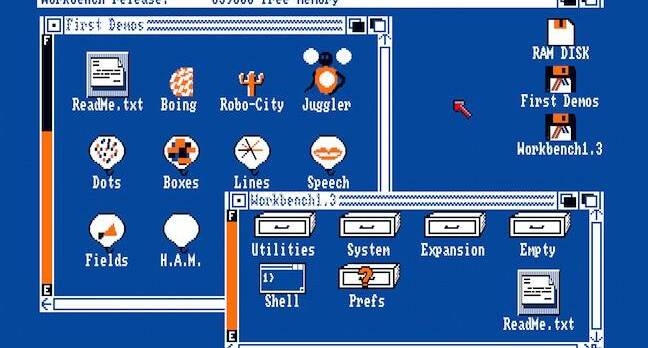
Amiga Emulator in Google Native Client

A Google chap named Christian Stefansen has created an Amiga 500 emulator that runs inside the Alphabet subsidiary's Chrome browser.
“The emulator code is based on the Open Source Universal Amiga Emulator which is about 400k lines of C code,” Stefansen says. He didn't cook up the code out of altruism: Google offers “Native Client”,billed as “a sandbox for running compiled C and C++ code in the browser efficiently and securely.” Porting the Amiga into the Native Client is therefore a good way to show it off to the curious or the nostalgic.
The former will find a pixellated and slow-to-respond windowing system and low-fi graphics (here for readers on mobile devices). The nostalgic may find the emulator a poor reproduction of a platform famed, at the time of its debut, for speed and efficiency.
Anyone will appreciate just how far we've come since the days of the Amiga, thanks to the inclusion of the famous "Juggler" app depicted below.
The app opens with a screen explaining the following feats of computation:
"The images were generated with a standard Amiga with 512K memory. A ray tracing method was used, which simulates rays of light reflecting within a mathematically defined scene. Each image requires the calculation of 64,000 light rays and takes approximately 1 hour to generate. An image is compressed to about 10K bytes for storage. Images are expanded in less than 30 milliseconds. The Amiga hold and modify mode is employed so that up to 4096 colors can be displayed at one time."
The emulator ships with other apps, too. But it also offers the chance to enable floppy disk emulators and load one's own disks. We're sure, however, that some of you remember exactly where they stashed their 3.5in floppies and the Amiga drivers that boosted the disks' capacity beyond the native 880 kilobytes.
Amiga juggler
The famous Amiga Juggler app, from a time when developers had many fewer resources to juggle
The emulator can be found here. ®

Friday, December 4, 2015

Google is making it easier for more games to come to Chromecast


Google wants more mobile game developers to create versions of their apps for TVs, and today the company released a free tool for developers using the Unity game engine to do that without having to design separate software. The Google Cast Remote Display plugin, as it's called, will make the process of streaming a game from a mobile device to a TV easier via the company's inexpensive Chromecast device. This way, developers only have to configure the game for a larger screen and players should be able to "cast" it to the big screen the same way one would stream a Netflix show.
It makes sense for Google to cater to Unity developers. Unity is far and away the most widely used game design toolkit in the world due mostly to its ease of use for creating and running mobile games. But Google has a few words of advice on game design. For instance, developers should create TV experiences that don't require the user to look back and forth between screens too often, Google says. It also urges developers to think about how to smartly map control schemes — like letting a mobile device become a motion controller — so users can more comfortably play. The company released a set of design guidelines today to ensure developers take these rules into account and use the Remote Display plugin in a consistent manner.

Tuesday, November 3, 2015

Google Refutes Rumors Of Chrome OS Merging With Android, Says It's Here To Stay


The Wall Street Journal dropped a bombshell last week when it reported that Google planned to merge Chrome OS with Android, and phase out the Chrome OS we've come to know and love. Googlers (including Android/Chrome head Hiroshi Lockheimer) reiterated the company's commitment to Chrome OS. Now, Google has made a post on the Chrome blog to set the record straight once and for all—Chrome OS isn't going anywhere.
In case you missed it, the WSJ report claimed that Google would show off the combined Chrome/Android OS in 2016, but it would not be ready for use on new devices until 2017. It also said that the devices we currently know as Chromebooks would get a new name to match the new OS. Google's blog post from Lockheimer makes it clear that Chrome OS and Android aren't merging. In fact, all Chromebooks are guaranteed to get Chrome OS updates for five years from release.
Google also points out that it has been expanding Chrome OS recently with the Chromebook for work program and the upcoming Asus Chromebit, which can turn any monitor into a Chrome OS box. Google is committed to Chrome OS, which makes you wonder where this WSJ story came from. A later report from Re/code pointed to a plan to revamp Android to work properly on a laptop form factor. It's possible the Wall Street Journal got the same information, but interpreted it differently (I think we can say wrongly now).
Screenshot 2015-10-29 at 9.52.59 AM
So, you don't need to worry about Chrome OS dying. The rumors of its demise were greatly exaggerated. Google is working on bringing the best features of Chrome OS and Android together, but they will remain distinct products.

Saturday, October 31, 2015

Microsoft Corporation Adds “Office Online” Extension To Chrome, Announces Skype Updates


Microsoft has introduced a number of new features, including cross-app integration for Skype and a new Chrome extension for Office Online

Oct 30, 2015 at 10:39 am Est


Microsoft Corporation Adds “Office Online” Extension To Chrome, Announces Skype Updates


Microsoft has announced on its Office blogs that, among other new features,
the company will finally be launching a Chrome browser extension for Office Online.
The company is committed to improving the experience provided to its customers on
 Mac, Office Online, Windows,Android and iOS. Users can get get the Office Online Chrome extension to freely open Word, PowerPoint, Excel, Sway, OneNote and
OneDrive documents from the Chrome browser.
Microsoft Corporation (NASDAQ:MSFT) has also promised to regularly incorporate customer feedback in its updates for MS Office. In the Office blog post, authored by
Office Corporate VP Kirk Koenigsbauer, Microsoft announced the introduction of an improved Navigation pane which will facilitate scrolling through extensive documents
on the online version of Word. Excel Online now sports better formatting options, while PowerPoint Online now performs better.
Office’s Android apps feature considerable improvements, with the Office apps’
“footprint” reduced by as much as 40%. Microsoft has promised to introduce more reductions in the footprint, while the process of signing onto the Microsoft service has
been streamlined as well. The Office apps are also compatible with Android for Work
and Android M now. Office 365 subscribers can take advantage of PowerPoint’s
Presenter View on the platform, allowing users to see speaker notes on a presentation
on an Android device.
Office’s Mac updates see improved Visual Basic Editor features based on customer feedback. From Project Viewer, users can Add Modules; A Dialog can be used to add Library References , while debugging can be carried out using shortcut keys.
Visual basic carries two new commands in the form of AppleScriptTask and GrantAccessToMultipleFiles, and also has “a new conditional,
MAC_OFFICE_VERSION.”
Microsoft has also provided better integration for Skype using Office Online,
which will be available globally to customers with a Microsoft account in November.
Skype provides video and audio integration on the online versions of Excel, PowerPoint, Word and OneNote. Outlook.com also gets the upgrade which allows users to chat up Skype contacts directly from the apps. Skype hopes to provide better integration and collaboration by allowing users to co-author documents. The IM history is linked to the relevant document, which is a helpful feature. Microsoft plans to bring Skype’s in-app integration features on the desktop version of Office 2016 as well.
Microsoft will roll out the features over the coming months and encourages feedback withOffice UserVoice. Office.com/2016 contains all the information about the new
Microsoft productivity suite. The latest additions are interesting, but are not necessarily things that were needed as such. Given the speed of computers these days, switching from one app to another is not as difficult or time-consuming as it used to be, and some users (like myself) would prefer to use distinctly separate applications for distinctly separate functions. The ability to place a call from Word is nice, but one can just as
easily open up the Skype application on the side and continue the conversation while working on a Word document in another window.
That said, there could be some potential time-saving uses for the in-app integrations. Microsoft’s Office Online offering has certainly been given a boost with the latest
features, while the introduction of an extension for Chrome is particularly interesting. It goes show how Microsoft is acknowledging Chrome’s popularity and how the company
is willing to restrict Office Online’s presence to just its Edge browser and the
now-defunct Internet Explorer browser.
For Microsoft, it represents another improvement for Skype this month after the
company earlier launched an upgraded Skype for Windowswith a built-in translator, released an iOS version of Skype for Business and more recently introduced video messages with filters for its Skype apps. With Google Inc (NASDAQ:GOOG)
beefing up its Google Docs offering, Microsoft needed something stronger to
fight back and it appears that Office Online has enough to keep customers hooked
on to the iOS, while the Chrome extension allows Microsoft to add more customers
to its Office Online offering.

Visit our website:  www.pixotritechnologies.com  , http://pixotrigames.com/

Friday, October 30, 2015

Why Google Tapped Android Over Chrome as Its Marquee OS

Google Hosts Its I/O Developers Conference


Android is a big deal for Google. It is Google’s portal for the smartphone market, where it maintains a global dominance. It is also Google’s choice of operating system for newfangled computing platforms, like wearables and cars.
And it may soon eat away at the primary home of Google’s other operating system, Chrome.
Starting next year, the company will work with partners to build personal computers that run on Android, according to sources familiar with the company’s plans. The Chrome browser and operating systems aren’t disappearing — PC makers that produce Chromebooks will still be able to use Chrome. But they will now have the choice of Android. And its arrival suggests the supremacy of mobile inside Google, which has prioritized how to best handle the shift away from desktop across all its divisions.
The Wall Street Journal earlier reported the change.
Google has been taking baby steps in this direction for years. Even back in 2009, when they launched Chrome, co-founder emeritus Sergey Brin suggested the two systems may merge. The convergence momentum began two years ago when Sundar Pichai took the reins of both operating systems. Last year, after Pichai was promoted to SVP of all products, he appointed Hiroshi Lockheimer, his anointed successor, as engineering lead for Android and the Chrome OS.
The company even gave us a hint. At its recent Nexus event, Google released its first Pixel C tablet that runs on Android. On the company earnings call last week, Pichai, now CEO, gave another, telling investors “mobile as a computing paradigm is eventually going to blend with what we think of as desktop today.” Turns out, eventually is coming soon.
So, why now?

Scale

Google loves scale. It shutters products with user numbers that many companies would kill for (remember Reader?) because they don’t reach the billion-plus of its flagships. Chrome primarily lives on Chromebook devices. Gartner estimates Google will ship 7.9 million devices this year. Android, Google recently announced, crossed 1.4 billion users. Very different scale.
Despite some traction, Chromebooks are still a tiny slice of the market, and Google has faced difficulty corralling developers to build apps for it. It hasn’t had the same problem with Android.

Simplicity

For some time, Google has struggled to juggle both operating systems. (It’s still doing so on television, simultaneously running Android TV and Chromecast.) It’s expensive to maintain both and can be confusing for device makers. Pichai likes streamlining. People who have worked with him describe a focus on simplifying Google’s products and historically Byzantine organization, an effort crystalized in a push for a uniform face on products for users and partners, what the company calls “One Google.”
However, a key advantage Chrome has is one of Android’s weaknesses. The mobile OS has suffered a nagging security issues, driven largely by its reliance on carriers and a gamut of device makers to push out updates. As an OS, Chrome is sturdier on security. That’s one reason Google may not ditch Chrome. Its security credentials help it with sales to enterprise, particularly to schools, where Chromebook has seen considerable traction; Gartner said the devices will account for 72 percent of the education market this year.

Mobile, Mobile, Mobile

Perhaps the critical reason Google is favoring Android is its birthplace: Mobile phones. The greatest threat to the Alphabet company is that its revenue, derived largely from desktop advertising, will dwindle as smartphone usage spreads. If it’s done anything this year (save the whole Alphabet thing), Google has manically reiterated that it does, in fact, have a cohesive plan for mobile. A chief Android distinction from Chrome is that it is built for mobile behavior.
A vote for Android is, in some ways, a tacit admission that Google must devote its attention to the devices on which it lives.
“Mobile gives us unique opportunities in terms of better understanding users,” Pichai said on the earnings call. “My long-term view on this is it is as compelling or, in fact, even better than desktop, but it will take us time to get there and we are going to be focused until we get there.”
Update:  Lest you think Chrome is on the way out, Lockheimer, now SVP of Android, Chrome OS and Chromecast, says it is not.

Visit our website:  www.pixotritechnologies.com  , http://pixotrigames.com/

Tuesday, May 19, 2015

Google's latest experiment brings new superpowers to Chrome browsers

Google's latest experiment might be the coolest Chrome extension we've seen yet.


Tone, the company's newest homegrown browser add-on, uses sound to quickly share URLs with anyone nearby. The extension is available now in Chrome's web store and can be used by any Chrome user, regardless of what type of computer they have.

In order for the extension to work, it must be installed on at least two computers that are close enough to be "within earshot" of each other and each machine must have its volume turned on. Once the tab you want to share with your neighbors is open, click on the extension in your browser's toolbar, wait for the series of beeps, and the link will be shared to all nearby computers via a Chrome notification.

SEE ALSO: Magical Chrome extension puts tabs to sleep so they don't kill your browser

The browser add-on was created in a single afternoon, Google's Alex Kauffman and Boris Smus write on the company's research blog.

"Tone grew out of the idea that while digital communication methods like email and chat have made it infinitely easier, cheaper and faster to share things with people across the globe, they've actually made it more complicated to share things with the people standing right next to you," Kauffmann and Smus write. "Tone aims to make sharing digital things with nearby people as easy as talking to them."


The extension comes from Google's research team who says the

In Mashable's testing, the extension worked surprisingly well — the extension was able to detect the beeps from a nearby laptop even when the sound was coming through headphones. The extension is also able to share to multiple computers at once, provided each one has the extension installed.

Behind the scenes, the browser too is meant to act much like actual speech, Kauffman and Smus say, noting that performance may vary based on other factors like distance volume levels.


SEO solution

We employ a variety of proven recommended techniques to increase your chance for top rankings.These include optimizing your website's page,content,and structure to drive traffic to your site for specific keyword research.Pixotri technology is a  creative house developing quality web designs, E-Commerce solution. SEO services and Gaming development.

Contact us for your SEOrequirement.email-info@pixotritechnologies.com. Visit our website:        www.pixotritechnologies.com