Tuesday, February 9, 2016

Featured Review: OnePlus iPhone 6/6s Case

The technology industry is an interesting roller coaster ride to say the least, one in which surprises even the most seasoned veterans at times.  Famed, and maybe even infamous, Android smartphone manufacturer OnePlus announced that they would be making an iPhone 6/6s case at the end of December, an announcement that stunned a number of people in the industry.  Given OnePlus rather interesting marketing tactics over the past 2 years since the company’s founding, it’s really no surprise to see them doing things that people wouldn’t expect, and namely things that keep their name going in the news headlines.  OnePlus certainly knows how to make a name for itself, so should you be carrying this name on your iPhone if you so choose to own one?  Let’s take a look.
Design and Fit
OnePlus-iPhone-Case-AH-NS-01


If you’ve ever used a hard plastic shell case for your phone you’ll know what to expect here.  The OnePlus case is a fairly simple plastic shell that wraps around the back and sides of the phone, leaving the top and bottom of the device completely uncovered.  Cutouts are made for the buttons on either side, and there’s a slight lip at the top to keep the screen from smacking flat on the ground if the phone is dropped.  This is fairly minimal coverage and is probably as little as you can get away with while still claiming the title of case.  On the bright side this lip isn’t high enough to intrude upon normal usage of swiping in from the sides, something that can get annoying with a big bulky case.  Having cutouts for all the buttons means they’re more exposed to the elements and to damage, however it keeps the experience pure and makes it feel like you’re using the phone more without 
a case than with one.
OnePlus-iPhone-Case-AH-NS-07     OnePlus-iPhone-Case-AH-NS-05    OnePlus-iPhone-Case-AH-NS-02  OnePlus-iPhone-Case-AH-NS-03
Installation of the case is as easy as snapping it onto the back, as the plastic the case is made of is slightly flexible and easily goes on, but still remains taut enough to stay on the phone.  What’s special about the case is not the plastic used to make it, rather the texture on the back.  You likely have heard of it if you’re familiar with OnePlus at all, it’s called Sandstone Black, and it’s a gritty, sandpaper-like material that adds grip and feels phenomenal.  It’s a far cry from the slippery powder-like finish Apple puts on the iPhone’s metal exterior, and it’s something that flat out rocks.  Some iPhone cases have a cutout for the Apple logo, something that’s overly gaudy and is clearly done to show a status symbol, however the OnePlus logo is clearly shown in place of Apple’s logo, which might be something a little strange to Apple users since it’s traditionally an Android brand.
Use and Durability
OnePlus-iPhone-Case-AH-NS-10
As the case doesn’t protect the top and bottom sections of the phone, it allows for easy access to the 3.5mm headset jack and lightning connector, as well as keeping the bottom speaker grille free from obstruction.  It also means that you’re likely to scratch the tops and bottoms on various things, especially if you’re a user that likes to place their phone on the table or somesuch location where it could come into contact with other objects.  This is certainly not a desirable trait in a case but given that it’s designed to offer minimal protection and be super light and unobtrusive, it sort of makes sense to be designed this way.  Still I would have liked to see protection for at least the top section since it’s got absolutely nothing up there but a shiny metal trim that’s asking to get scuffed.
OnePlus-iPhone-Case-AH-NS-04
The back material is gritty and grippy, although it’s not nearly as coarse as the Sandstone material found on the OnePlus One or 2.  While this means it’s not 100% as grippy as those phones, it’s far more grippy than you would find without a case on the iPhone, and certainly more so than those flat plastic or TPU cases floating around out there.  In addition to this the difference in material might mean that it lasts longer than the gritty material used on the OnePlus One at least, as that phone tended to have its back smooth out over time due to the friction of putting it in a pocket constantly.  This means after a few months the OnePlus One would end up feeling a bit gummy on the back instead of gritty, leaving a rather unpleasant feeling in the hand.
Thus far in the usage I’ve not seen such an effect happen, and it was clearly a noticeable degradation in quality after just a few weeks on the original OnePlus One, although the 2 seems to have lasted a bit longer.  This isn’t surprising given the general improvements that are made to any manufacturing process over time, and OnePlus’s design language has clearly improved over time too.  I imagine the grip would only last a few months given the fact that it’s still a material sprayed over a plastic case to create a texture, however it’s clear the process has improved enough to give it some additional longevity.
Conclusion
OnePlus-iPhone-Case-AH-NS-11
For $20 you’re looking at a pretty average shape case that provides minimal protection, but also weighs next to nothing and adds very little bulk to the phone.  The case did come with a OnePlus X invite originally, but since the X is now available forever without an invite such a thing wouldn’t make sense to continue to include to entice iPhone buyers into the Android ecosystem, unless of course OnePlus is just using it as a marketing device. There’s little else inside this package to offer any additional value, so if you’re looking for a minimal case like this to keep the screen from cracking this isn’t too bad of an option, but at $20 it certainly feels a little more expensive than I’d like to see from such a minimal case.
OnePlus-iPhone-Case-AH-NS-13  OnePlus-iPhone-Case-AH-NS-14
The bright side of a minimal case like this is it makes the phone feel more “natural” instead of completely covered up in some giant obtrusive thing, however, it means less protection overall if you do experience a drop of the phone.  Personally, I’d prefer a case like this as I don’t like cases covering up my phone no matter what I’m carrying, and the added protection where it exists is certainly not a bad option.  This one is only available for the smaller version of the 6/6s, so no Plus size, which is sort of ironic given that OnePlus makes it.  Check out the OnePlus site to get your own if you’re interested!

It's official: Instagram for iOS now supports multiple account switching


Instagram has officially announced that it has begun rolling out support for switching between multiple accounts in its iOS app, without requiring users to log out and log back in.
The popular Facebook-owned photo- and video-sharing app began testing the much-requested feature with some users on Android in November. But as noted by Latergramme last week, some users on iOS had also been granted access to multi-account switching.
Now, Instagram has come out with an acknowledgment that, yes, multi-account switching has indeed arrived on iOS.

How can you enable multi-account switching?

Before anything else, it’s worth pointing out that while Instagram has officially announced the feature, multi-account switching is still being rolled out. This means that not all users of Instagram for iOS already have access to it.
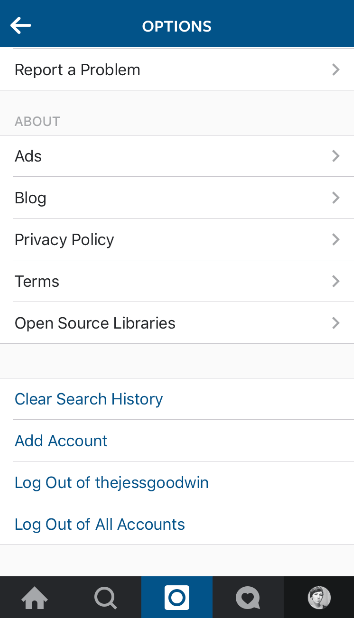
Instagram Add Account
To find out if you’re one of the users who already have access to multi-account switching, make sure you have the latest version of Instagram for iOS (version 7.15), open the app, and follow these steps:
  1. Go to the profile tab.
  2. Tap the settings icon.
  3. Scroll down and see if there’s an option labeled “Add Account” near the bottom, as shown in the screenshot above.
  4. If the option is not there, it means that you still don’t have access to multi-account switching. But there is an “Add Account” option, tap it and enter the username and password for the account you’d like to add.
Note that you can enable multi-account switching for up to five accounts.

How do you switch between accounts?

As suggested in the screenshot below, switching between multiple accounts can be easily done with these steps:
  1. Go to the profile tab.
  2. Tap the profile name at the top of the screen.
  3. Tap the account you’d like to switch to.
Instagram switch accounts
Note that you can also add an account right from the account selection menu.

What happens to your push notifications?

With multi-account switching enabled, you can quickly and easily switch between multiple Instagram accounts and access their respective feeds, comments, and direct messages without having to log out and log back in. What’s more, as shown in the screenshot below, your push notifications will indicate which accounts your received likes and comments are for.
Instagram multiple account push notification
“If you’ve added multiple Instagram accounts, you may get push notifications from any account that has them turned on,”Instagram notes. “This depends on when you last logged in and the number of devices that are logged in to an account.”

Do you already have it?

For users who own and manage more than one Instagram account, such as those who maintain accounts for personal and commercial uses, multi-account switching has been a long time coming. But as mentioned, the feature is still being rolled out, hence its availability to some and unavailability to others.
Either way, be sure to update to the latest version of Instagram for iOS, which is free to download from the App Store, and let us know in the comments below whether or not you already have multi-account switching. I for one am yet to get the feature.

How to Import iPhone Photos to Windows 10


If you've switched from a Mac to a PC, but still use an iPhone, you're probably wondering how you're going to start managing your smartphone's camera roll. Fortunately, you don't need Apple's Photos image management app to easily access the images on your phone, you just need to know how to set things up. 

screenshot (165)

Below we'll show you how to sync the photos from your iPhone to a Microsoft OneDrive account and then download them your PC. Once everything is set up, your images will be constantly syncing in the background, with or without taxing your mobile data plan.
Before you get started, make sure you've created a Windows Account with Microsoft, as it will be necessary for this process. Each account comes with 5GB for free, just like Apple provides.

How to Import iPhone Photos to Windows 10

1. Click the Start button.
screenshot (126)
2. Type "Phone companion" into the search prompt.
screenshot (127)
3. Select Phone Companion from the top of the Start menu.
screenshot (128)
4. Click iPhone or iPad.
screenshot (129)
5. Enter your Microsoft account information and click Sign in.
screenshot (131)
 6. Click "Sign in to just this app instead" to proceed if you don't want to sign into your PC with your Microsoft account, or fill in your PC's sign in password and click Next. You will not see this window if you already log into your PC with your Microsoft account.
screenshot (132)
7. Select the "Get started" button underneath "Get photos you take with your iPhone or iPad onto your PC, automatically."
screenshot (133)
8. Tap Yes, This Is Me!  to confirm your identity.
screenshot (135)
9. Enter your email address and click Send. Microsoft will email you a direct link to OneDrive in the iOS app store. If you tap this link on  your iPhone, you'll be prompted to download the app.  You can also search for OneDrive in the app store on your phone.
screenshot (136)
10. Select Get next to OneDrive on your iPhone.
img 9649
11. Tap Install.
img 9652
12. Select Open.
img 9653
13. Enter your Microsoft account name and click Go.
img 9654
14. Enter your Microsoft account password.
img 9656
15. Tap OK or No, Thanks to agree or disagree to have OneDrive send notifications. It doesn't matter which you choose for our purposes. We selected No, Thanks"
img 9658
16. Tap the User icon in the upper left corner.
img 9659
17. Select the Gear icon.
img 9660
18. Tap Camera Upload.
img 9661
19. Move the switch next to Camera Upload to the On position.
img 9663
20. Select OK.
img 9664
21. Select either Don't Allow or OK, it doesn't actually matter, so defer if you're trying to limit notifications.
img 9666
22. Turn the switch next to Upload In Background to the On position.
img 9667
23. Tap Turn On in the bottom right corner to agree to Location Tracking for OneDrive. You might not want to, but it's necessary for background uploads.
img 9668
24. Tap Allow to give Location permissions to OneDrive. Yes, it's a little redundant, but this is the tap that actually grants permissions to the app.
img 9670
25. Back on your PC, check the check-box next to "I'm signed in to the OneDrive app on my iPhone or iPad" and select Next.
screenshot (138)
26. Check the box next to "I turned on Camera Upload in the OneDrive app on my iPhone or iPad."
screenshot (140)
24. Select Done.
screenshot (141)
25. Tap the Start button to open the Start menu.
untitled 2
26. Type "Photos."
untitled 1
27. Select Photos.
screenshot (143)
28. Tap the Gear icon.
screenshot (153)
29. Toggle on the switch next to Show my cloud-only content.
screenshot (158)
OneDrive will now import all of the photos on your iPhone to its servers and the Photos app!
screenshot (162)

Monday, February 8, 2016

Android-x86 4.4-r5 Might Be the Last Release in the Android 4.4 "KitKat" Series


We reported two weeks ago that the Android-x86 4.4-r4 might just be the last in the Android 4.4 KitKat-based series of the Linux distribution, but it looks like the developers decided to make one more maintenance release.
And so, the Android-x86 4.4-r5 build has been released the other day and it is now available for download, for new users, or upgrade, to existing ones. The fact of the matter is that Android-x86 4.4 is currently the only stable branch of the project.
It's, of course, a quick bugfix release that patches a more some issues with hazi fonts in the Mesa 3D Graphics Library 10.5.9, which were reported by users with Intel i5 GPUs. So if you still encounter the hazi fonts issue with your Android-x86 4.4 build, you need to upgrade.
"The Android-x86 4.4-r5 is a bugfix of the 4.4-r4 release. It addresses more hazi fonts issue of Mesa 10.5.9 found on Intel Gen5 GPUs. You are encouraged to upgrade to this release if you still encountered the hazi fonts issue," developers explained.

Some known issues are still present in this release

From the release notes, it looks like there are still some knowing issues for this version, which users should be aware off. For example, on some machines, the suspend and resume functionality might not work as expected, and the installer it now capable of formatting partitions with the EXT3 file system.
If this is the first time installing Android-x86 on your computer, you should download the Android-x86 4.4-r5 ISO images right now via our website. On the other hand, we recommend existing users to upgrade to the Android-x86 4.4-r5 release as soon as possible.

iPhone 7 Rumours, Release Date, Leaks and News: Everything You Need to Know


Get a new iPhone for Christmas? Sorry – it’s already old news. 2016 is the year of the iPhone 7 — get used to it. With sales stalling for the first time in the iPhone’s history, Apple needs to pull something truly impressive out of the bag to bring the love back, and now’s as good a time as any to gather up the best iPhone 7 rumours swirling around the high-tech ether.
If the 6S was a mostly incremental upgrade, the freshly-numbered iPhone 7 should have a little more innovative bite, going by Apple’s traditional “fallow year” release cycle. From Lightning Port headphones to more capacious storage, here are all the important iPhone 7 rumours we’ve heard so far, with a couple of duds thrown in for shits and giggles.

Less Is More?


So Apple seems to think, as it once again is reportedly slimming down the handset. We’re not quite as convinced. Though we were sceptical when we first heard that Apple was considering dropping the iPhone’s headphone jack in order to make it slimmer, the rumour’s gained a lot of momentum in recent weeks. There are claims that the headphone jack will be replaced by an all-in-one Lightning connector for both charging and audio, but there’s also talk of Apple simply working on wireless earphones.
No matter what they want you to think, thinner isn’t always better. A skinnier iPhone would almost certainly feature a smaller battery, and that’s not something anybody wants. Regardless, there’s absolutely no need to go any slimmer than 7.1mm. Seriously. Who cares?
Well, maybe those annoyed with the iPhone 6S’s camera bump, at least. According to MacRumors the iPhone 7 is said to feature a flush, flat rear, letting the lens sit in line with the aluminium casing. This may be a result of a dual-camera system, according to 9to5Mac, which would allow for higher quality images and maybe even an optical zoom.
If that wasn’t enough, it sounds like Tim Cook and co also want to retire the iPhone’s home button. The suggestion is that iPhone’s fingerprint reader could be integrated with the screen itself, enabling users to essentially scan their prints anywhere. In terms of replacing the app switching/home screen functionality of the home key, rumour has it that Apple will create a soft key or add a new feature to 3D Touch, which is itself bound to be improved. Hopefully we’ll soon be able to scroll through content previews, rather than just peek at static thumbnails.

More Is… Also More


There’s talk too of a new storage option, with gossipers seemingly convinced that a 256GB iPhone is in the works. Here’s where things become a little murky. Some reports suggest this storage option would only apply to the iPhone 7 Plus, but it seems unlikely that Apple would offer different capacities for the iPhone 7 and 7 Plus. What seems more plausible is the retirement of the 16GB model, which we’ll be pleased to see the back of.Slightly more promising — and therefore slightly less believable — gossip claims that Apple is instead working hard to improve the iPhone’s battery life. A larger 3,100mAh battery is music to our ears, and should offer significantly better stamina than the 1,715 mAh number powering the iPhone 6S. Then again, this rumour crops up ahead of every new iPhone launch, and our hopes always tend to be dashed.

Durability, At Last

Something we can definitely get on board with is ruggedisednessment. Water- and dust-resistance have been near the top of most people’s iPhone wish lists for a couple of years now, so if Apple decides not to include so-called ‘rugged’ features on the iPhone 7, we’ll be mighty disappointed. Come on Timmy, we’ve wanted this for ages now. Haven’t you ever accidentally spilled water on your phone? Ahhh, of course, you don’t need to pay for a replacement.
A patent request describing a rubber port cover capable of forming a watertight seal around an accessory input was discovered in December, and offers a potential insight into Apple’s plans. Then again, it could be yet another filing that’s never acted on, ever.
One of the more far-fetched rumours we’ve come across is based on an Apple patent describing a weird system where bumpers would spring out from the edges of the screen, ensuring the glass would never make contact with the floor. Sort of like an airbag for your iPhone. Imagine that for a moment. Obviously not going to happen.

A 4K iPhone 7 Screen? Nah

Unless Apple gets really desperate, the iPhone 7 isn’t going to feature a 4K — or even a QHD — display. The iPhone 6S doesn’t even have a Full HD resolution, so such a move is basically out of the question. It seems more likely that the iPhone 7 will feature the same-sized 4.7-inch screen as the 6S, but with a slight jump in pixel count.
3D Touch will, of course, make an appearance too, but there’s also fresh talk that Apple plans a switch from LCD to OLED technology. Without getting into the nitty-gritty, this essentially means that the iPhone 7’s display would be significantly better for watching movies and TV shows on. Think deeper blacks and more eye-popping colour.

Anything Else?


It is likely, however, that the iPhone 7 will be more powerful than the iPhone 6S. There have been mutterings of the inclusion of an impressive-sounding hexa-core A10 chip, though that would represent a massive step up from the dual-core processor in the iPhone 6S. RAM, however, is likely to stay at 2GB.Since Apple overhauled its camera tech for the iPhone 6S, replacing its old 8MP snapper with a shiny new 12MP one and boosting the front-facing camera up to 5MP, last year, we don’t expect a great deal of change in this area. The arrival of OIS would be great, though the iPhone 7 Plus may keep that to itself.
Fresh reports suggest Apple’s working on a new wireless charging technology, which would allow users to power up their phones without direct contact with a power mat. We’re not sure the company will bring the feature forward this year, as the technology required to capture enough energy is, for now at least, rather bulky.
As ever, we’ll keep dreaming our little dreams of expandable storage too.

iPhone 7: Price and Release

Brace yourself. It looks like Apple will stick with tradition and launch the iPhone 7 alongside an iPhone 7 Plus at a special event in California in September. We’re also going to stick our necks on the line and guess that the phones will hit the market around two weeks after. I know, we’re good.
With that launch being over half a year away, there are precious few price rumours floating around. In all likelihood, the iPhone 7 will once again come in silver, space grey, gold and rose gold variants and cost a touch more than its predecessor, which currently retails from $929 in Australia.

Google has been helping HMRC with software for two years


Google

Tory ministers are facing fresh questions over the Government’s business links with Google.
The Sunday Mirror last week revealed the high tech giant was brought in by HM Revenue and Customs to run back office digital services amid negotiations over how much backdated corporation tax Google should pay.
Since then, it has emerged that Google software has been used for mobile phone systems and running video conferences at the government tax collection department since March 2014.
Our revelations have raised serious questions over the Government’s “cosy” relationship with Google after the US company’s “sweetheart” £130m tax deal provoked uproar last month.
The latest row comes as up to 350 HMRC workers in Wrexham, North Wales, face losing their jobs when their office closes under government cuts. Staff have questioned the department’s close ties with Google amid claims the company is getting special treatment.
Local Labour MP Ian Lucas has now raised a series of Parliamentary questions about Google’s relationship with HMRC and the Treasury over the past five years.
The internet giant provides services under an existing IT contract between HMRC and data processing firm Capgemini UK which outsources work to firms like Google.
In a series of written questions, tabled in the Commons, Mr Lucas asked Chancellor George Osborne whether any agreements had been made between HMRC and Google and to provide details of any discussions between ministers and Google.
In a written reply, Treasury minister David Gauke says HMRC has used Google Chrome software for running video conferences for nearly two years. Financial details of the deal have not been disclosed.
But Mr Gauke said no discussions had taken place between HMRC and Google about computer software for the collection of tax in the UK.
Mr Lucas said: “I am determined to keep delving.”

Google removes from Play Store over 200 apps infected with ad fraud targeted through Twitter's MoPub


Ad fraud apps in Google Play Store
Google removes from Play Store over 200 apps that were victims of mobile app ad frauds

Security researchers have disrupted an ongoing mobile phone app ad fraud scheme, operating through MoPub, the mobile advertising platform owned by Twitter. The mischievous apps generate more than $250,000 (£172,351, €224, 466) revenue per day through the ad fraud.
Researchers at Sentrant Security, which conducted the investigation on the mobile app ad fraud scheme, claim to have identified a total of 247 apps containing ad frauds available for download in the Google Play Store, estimating a total app installation of between 282,998 and 1,193 665.Google, after being notified by Sentrant, removed all the rogue apps from Play Store.
"In reaction to our communication with Google, all apps have been removed from the Play Store. But apps already installed on user devices would not be affected as users would need to uninstall the apps themselves," Hadi Shiravi, the co-founder of Sentrant Security, told IBTimes UK.
Shiravi also revealed that this is one of the most sophisticated ad fraud schemes that had targeted mobile apps in hundreds of thousands of devices running code that run non-viewable ads in the background.
According to Sentrant, the ad fraud scheme was developed and operated by mobile app company Academ Media, which has a network of over 20 shell companies to execute the fraud operation by targeting Twitter's MoPub, the largest mobile ad exchange.
Meanwhile, Academ Media, a private company based in the Siberian city of Novosibirsk, denied the allegations. It claimed its systems were hacked by attackers, who stole their data a year ago and modified the company's apps to commit advertising fraud.
Tim Prokhorov, head of business relation at Academ Media told Financial Times the company is nowhere related to these new apps and they must have been created by hackers using the codes stolen earlier.
Ad fraud though Twitter's MoPub
Sentrant claims the custom ad fraud code was integrated into several legitimate apps. The fraudsters used two distinct techniques to hide the ad fraud such as proxy detection and long sleep duration. These two techniques bypass detection.
The fraudster targets MoPub by inserting the ad fraud code directly into the advertising software development kit (SDK) of MoPub and then rebuilding a custom version of the SDK. In order to bypass the ad fraud detection mechanism, the custom SDK spoofs the device ID along with other parameters such as manufacturer, product, device height and width.
Google in its response said, "While we don't comment on specific apps, we can confirm that our Google Play policies are designed to provide a great experience for users and developers. That's why we remove apps from Google Play that violate those policies."